- Home Page /
- Electronics /
- Computer Accessories /
- Networking Products /
- Routers /
- TP-Link AC1900 Touch Screen Wi-Fi Gigabit Rou...
0 ratings


Item #:
1479536
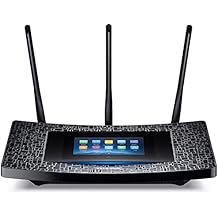
TP-Link AC1900 Touch Screen Wi-Fi Gigabit Router
Item #:
1479536
TMT 432
Price Details
Excluding Shipping & Custom charges ( Shipping and custom charges will be calculated on checkout )
*All items will import from US
0 ratings
Write a review
In stock
 Imported from USA store
QTY:
Order now and get it around Wednesday, July 01
Secured transaction
Ubuy works hard to protect your security and privacy. Our advanced payment security system ensures confidentiality by encrypting your information during transmission using AES (Advanced Encryption Standards) and SSL (Secure Socket Layer) protocols. Your payment details are 100% secure as we do not share your payment details with third party sellers.
Our Top Logistics Partners


Upgrade to the latest, most powerful Wi-Fi technology with the Touch P5's lightning-fast AC1900 Wi-Fi and seamlessly stream 4K HD video and game online

Fast
Shipping

Free
Return*

Secure Packaging

100% Original Products

PCI DSS Compliance

ISO 27001 Certified


Note: Step Down Voltage Transformer required for using electronics products of US store (110-120). Recommended power converters Buy Now.


What Stands Out
Touch Screen Control
Easily manage your network with a user-friendly touch screen interface, simplifying setup and adjustments without needing a complicated app or manual.
High Speed Performance
Supports dual-band Wi-Fi with speeds up to 1900 Mbps, ensuring smooth streaming, gaming, and browsing across multiple devices without lag.
Robust Security Features
Includes advanced security protocols and parental controls, providing peace of mind by protecting your network from unauthorized access and ensuring safe browsing experiences.
Product Details
- Upgrades your network to the latest 802.11ac Wi-Fi technology
- Dual-band Wi-Fi for lag-free 4K HD video streaming and online gaming
- Intuitive touchscreen display for easy setup and network management
- 1GHz dual-core processor for smooth multitasking
- Beamforming technology for stronger Wi-Fi connections
- Four gigabit Ethernet ports for fast wired connections
| Item Weight | 2.64 lbs (1.2 kg) |
Who Should Buy?

-
Gamers
Ideal for gamers requiring high-speed internet and low latency for an immersive online gaming experience.
-
Smart Homes
Perfect for smart home setups managing multiple devices simultaneously with reliable Wi-Fi connection.
-
Tech Enthusiasts
Great for users who appreciate modern technology, including touch screens and advanced features for managing network settings.

-
Basic Users
Not suitable for casual users who only need minimal internet use and simpler router features.
-
Budget-Conscious
May not fit those on a tight budget as it could be more expensive compared to basic routers.
-
Large Households
Could struggle to cover extensive areas in very large homes, especially with many simultaneous connections.
Product Description
TP-Link AC1900 Touch Screen Wi-Fi Gigabit Router
Have any Query? Chat with us
Customer Questions & Answers
-
Question:
What features does the TP-Link AC1900 Touch Screen Wi-Fi Gigabit Router offer?
Answer: The TP-Link AC1900 comes equipped with dual-band capabilities, delivering speeds of up to 1900 Mbps. Its standout feature is the intuitive touch screen interface, which makes managing settings a breeze. Additionally, it supports advanced security protocols like WPA3, ensuring a secure connection for all your devices. With MU-MIMO technology, multiple devices can connect simultaneously without a lag, making it ideal for busy households where streaming, gaming, and browsing happen at the same time. -
Question:
How does the touch screen interface enhance user experience?
Answer: The touch screen interface on the TP-Link AC1900 allows for seamless navigation through settings and features. Rather than relying on complex menus accessed through a computer, users can easily adjust settings or monitor network status directly from the router. This feature is especially useful for non-technical users, who can manage their Wi-Fi network with just a few taps, making troubleshooting or modifications straightforward. -
Question:
Can the TP-Link AC1900 support multiple devices at once?
Answer: Yes, the TP-Link AC1900 is designed to support multiple devices simultaneously without sacrificing speed, thanks to its MU-MIMO technology. This capability allows it to communicate with multiple devices at the same time, which is excellent for households with smart TVs, gaming consoles, laptops, and other connected devices. So whether you're streaming a movie on one device while another family member plays a game, you can enjoy a smooth experience without interruptions. -
Question:
What is the coverage area of the TP-Link AC1900 router?
Answer: The TP-Link AC1900 is engineered to cover large areas with its strong signal. Typically, it can effectively cover homes up to 2,500 square feet, making it suitable for medium to large-sized homes. The powerful antennas and Beamforming technology enhance the signal strength and direct it towards your devices, providing stable connections even in hard-to-reach corners of your home, like basements or large multi-story houses. -
Question:
Is it user-friendly for non-tech savvy individuals?
Answer: Absolutely! The TP-Link AC1900 prioritizes user-friendliness with its touch screen interface and setup process. The quick installation guide helps users through the initial setup without hassle, and the visual touch screen allows for quick adjustments. Non-tech savvy individuals can easily manage their Wi-Fi settings or troubleshoot common issues, making it a great choice for all levels of users. -
Question:
How does the TP-Link AC1900 ensure network security?
Answer: The TP-Link AC1900 incorporates advanced security protocols, including WPA3 for stronger encryption and protection against unauthorized access. It also has a built-in firewall and supports VPN passthrough, which can help further secure your network. For those who are concerned about online privacy, this router provides robust security features that allow users to create secure connections when accessing sensitive information or when banking online. -
Question:
Can I prioritize bandwidth for certain devices with the TP-Link AC1900?
Answer: Yes, the TP-Link AC1900 allows users to manage bandwidth allocation through its Quality of Service (QoS) settings. This means you can prioritize bandwidth for devices that need it most, like streaming services or online gaming consoles. This feature is particularly useful in households where multiple users are consuming bandwidth simultaneously, ensuring that everyone enjoys the best possible performance according to their specific needs. -
Question:
What kind of internet connection is compatible with TP-Link AC1900?
Answer: The TP-Link AC1900 router is compatible with various internet service types, including cable, DSL, fiber, and satellite connections. As long as you have a modem that connects to your ISP, this router can handle it. This versatility makes it a great option for anyone looking to upgrade their home network setup, regardless of their current internet service provider, allowing room for future upgrades as well. -
Question:
How can I manage my network remotely with the TP-Link AC1900?
Answer: You can manage your network remotely using the TP-Link Tether app available for iOS and Android devices. This app provides full access to your router's features, allowing you to monitor network activity, change settings, and manage connected devices from anywhere. This feature is incredibly convenient for users who want control over their home network while away, enabling easy adjustments and security management even on the go. -
Question:
Where can I buy the TP-Link AC1900 Touch Screen Wi-Fi Gigabit Router?
Answer: You can purchase the TP-Link AC1900 Touch Screen Wi-Fi Gigabit Router from Ubuy within Turkmenistan. Ubuy offers a variety of authentic tech products available for online shoppers and ensures a secure purchasing experience, making it easy for customers to find and buy the router they need.
TP-Link Routers Editorial Review
The TP-Link AC1900 Touch Screen Wi-Fi Gigabit Router is an excellent router with great coverage and is easy to use. The touchscreen is clear, user-friendly and easy to set up without instructions. Connection range is great, it travels about 50 ft through about 5 walls and can connect a printer to use as a network printer. The router is also WEP enabled. The 2.4 GHz and 5 GHz protocols work well for various devices. The firmware does not need updating and is working very well. However, there were some issues with the data entry port which resulted in signal loss when the wire moved. Although works great and is easy to set up, the touchscreen may sometimes have problems recognizing touches on the on-screen keyboard.
Customer Reviews & Ratings
1 customers ratings
-
5 Star
100%
-
4 Star
0%
-
3 Star
0%
-
2 Star
0%
-
1 Star
0%
Review this product
Share your thoughts with other customers
Pros
- Excellent coverage
- User-friendly touchscreen
- Easy to set up
- Connects to printer
- Has 2.4 GHz and 5 GHz protocols
Cons
- Loose connection at the data entry port which may result in signal loss
Product Price History
Important information
- Limitations : For products shipped internationally, please note that any manufacturer warranty may not be valid; manufacturer service options may not be available; product manuals, instructions, and safety warnings may not be in destination country languages; the products (and accompanying materials) may not be designed in accordance with destination country standards, specifications, and labeling requirements; and the products may not conform to destination country voltage and other electrical standards (requiring use of an adapter or converter if appropriate). The recipient is responsible for assuring that the product can be lawfully imported to the destination country. When ordering from Ubuy or its affiliates, the recipient is the importer of record and must comply with all laws and regulations of the destination country.
- Not all the products listed on Ubuy are for sale, as Ubuy is a global search engine. Products are subject to export/trade regulations.
TMT 432
Order now and get it around Wednesday, July 01
This item is not restrict in my country.(Please click on above link if this item is not restrict in your country, So our team will review and allow.)
QTY:
Secured transaction
Ubuy works hard to protect your security and privacy. Our advanced payment security system ensures confidentiality by encrypting your information during transmission using AES (Advanced Encryption Standards) and SSL (Secure Socket Layer) protocols. Your payment details are 100% secure as we do not share your payment details with third party sellers.
Our Top Logistics Partners
Fastest cross-border delivery
Features & Benefits
- Upgrades networks to 802.11ac, the latest, most powerful Wi-Fi technology
- Blazing Wi-Fi over 5GHz (1300Mbps) and 2.4GHz (600Mbps) bands for lag-free 4K HD video streaming and online gaming
- Intuitive touchscreen display for easy setup and network management
- 1GHz dual-core processor handles multiple tasks at once without interruption
- Beamforming technology focuses Wi-Fi towards devices to form stronger connections
- Four gigabit Ethernet ports for lightning-fast wired connections