- Home Page /
- Electronics /
- Computer Accessories /
- Networking Products /
- Network Adapters /
- USB Network Adapters /
- Microsoft 4k Wireless Display Adapter - Black...
0 ratings


Display wirelessly to a 4K TV or monitor over Miracast with upgraded resolution to support TVs and monitors up to 4K at 30fps. Easy setup with reliable connection up to 10 meters in an open environment, or up to 7 meters in a living room or office.Quick connect with faster bootup time and simpler operations than current Wireless Display Adapter. HDMI-CEC support to easily connect to your TV without having to change inputs with a remote.
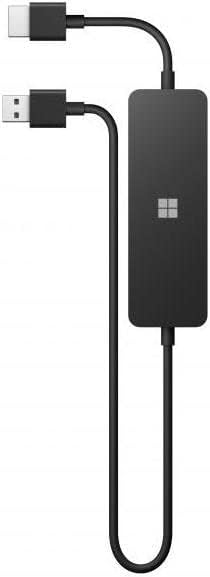
Microsoft 4k Wireless Display Adapter - Black. Compatible with 4K TVs
0 ratings
Write a review
Out of stock
 Imported from USA store
Secured transaction
Ubuy works hard to protect your security and privacy. Our advanced payment security system ensures confidentiality by encrypting your information during transmission using AES (Advanced Encryption Standards) and SSL (Secure Socket Layer) protocols. Your payment details are 100% secure as we do not share your payment details with third party sellers.
Our Top Logistics Partners


Display wirelessly to a 4K TV or monitor over Miracast with upgraded resolution to support TVs and monitors up to 4K at 30fps. Easy setup with reliable connection up to 10 meters in an open environment, or up to 7 meters in a living room or office.Quick connect with faster bootup time and simpler operations than current Wireless Display Adapter. HDMI-CEC support to easily connect to your TV without having to change inputs with a remote.

Fast
Shipping

Free
Return*

Secure Packaging

100% Original Products

PCI DSS Compliance

ISO 27001 Certified


Note: Step Down Voltage Transformer required for using electronics products of US store (110-120). Recommended power converters Buy Now.


What Stands Out
4K Compatibility
Seamlessly connect with any 4K TV, delivering stunning visuals and clarity for an exceptional viewing experience whether streaming movies, playing games, or showing presentations.
Wireless Convenience
Eliminate the clutter of wires with this wireless adapter, providing freedom of movement and easy setup for any multimedia environment, making it perfect for home or office use.
Universal Compatibility
Works effortlessly with a range of devices, including laptops, tablets, and smartphones, allowing for versatile connectivity options and comprehensive compatibility across platforms.
Product Details
- Wirelessly display to a 4K TV or monitor over Miracast
- Supports TVs and monitors up to 4K at 30fps
- Easy setup with reliable connection up to 10 meters in an open environment
- Quick connect with faster bootup time and simpler operations than current Wireless Display Adapter
- Support for Surface Duo and Miracast-enabled Android devices
- HDMI-CEC support for easy TV connection without changing inputs with a remote
| Package Weight | 1.265 Pound |
Who Should Buy?

-
Home Entertainers
Ideal for users who enjoy streaming movies and shows directly from their devices to a 4K TV.
-
Business Presenters
Great for professionals needing to wirelessly project presentations and documents during meetings on larger screens.
-
Gamers
Perfect for gamers wanting to mirror gameplay from their devices to a 4K TV for an enhanced experience.

-
Non-4K Users
Not suitable for users with non-4K TVs as it won't utilize the adapter's full capabilities.
-
Limited Range Areas
Users in larger homes may experience connectivity issues due to the limited wireless range of the adapter.
-
Device Compatibility
Individuals with older devices may not benefit from the adapter due to compatibility issues with certain operating systems.
Product Description
Microsoft 4k Wireless Display Adapter - Black. Compatible with 4K TVs
Have any Query? Chat with us
Customer Questions & Answers
-
Question:
What is the Microsoft 4K Wireless Display Adapter?
Answer: The Microsoft 4K Wireless Display Adapter is a device that allows you to stream content wirelessly from your Windows PC, tablet, or mobile device to your 4K TV or monitor. This adapter uses Miracast technology to provide a seamless connection, enabling you to display videos, photos, presentations, and other media without the need for cables. It's ideal for users who want to enhance their home entertainment experience or facilitate presentations in a business setting. -
Question:
How does the 4K Wireless Display Adapter connect to my TV?
Answer: The 4K Wireless Display Adapter connects to your TV via an HDMI port. Once plugged in, it connects to your device over Wi-Fi, allowing for screen mirroring or extending your display. Simply select the adapter from your display options on your device, and you can effortlessly project content onto your TV without messy cables. This feature is particularly beneficial for users wanting to keep their living spaces tidy and clutter-free. -
Question:
Is the Microsoft 4K Wireless Display Adapter compatible with all TVs?
Answer: The Microsoft 4K Wireless Display Adapter is compatible with any TV that has an HDMI port. However, to fully utilize its capabilities, you should have a 4K TV to ensure optimal resolution and streaming quality. For users with standard HD TVs, the adapter will still work but with lower display resolutions. This versatility makes it a great choice for various home entertainment setups. -
Question:
What devices are compatible with the Microsoft 4K Wireless Display Adapter?
Answer: The adapter is compatible with a range of devices, including Windows PCs, tablets, and smartphones that support Miracast. Additionally, it's also workable with Android devices that have the necessary wireless display features. This compatibility allows you to stream content from multiple sources, making it ideal for watching movies, playing games, or giving presentations, all from various devices. -
Question:
Can I use the adapter for gaming?
Answer: Yes, the Microsoft 4K Wireless Display Adapter can be used for gaming, provided that your gaming console or PC supports Miracast. By projecting your games onto a larger screen, you can enjoy a more immersive experience. However, keep in mind that some users may experience latency depending on their Wi-Fi connection, which could affect gameplay, so a strong connection is recommended for the best experience. -
Question:
Does the adapter require any software installations?
Answer: Generally, the Microsoft 4K Wireless Display Adapter does not require additional software installations, as it utilizes the built-in Miracast support in Windows 10 and Windows 11. This makes setup straightforward and user-friendly, as most devices will automatically recognize the adapter. For smooth operation, ensure your Windows and device firmware are up to date to leverage all features efficiently. -
Question:
How far can I use the Microsoft 4K Wireless Display Adapter from my TV?
Answer: The optimal range for the 4K Wireless Display Adapter is approximately 23 feet (7 meters) without any obstructions. This distance allows for streaming and mirroring capabilities without noticeable disruptions. However, walls or other electronic devices may interfere with the signal, so it's best to use the adapter within a direct line of sight to your device for optimal performance. -
Question:
Can I connect multiple devices to the 4K Wireless Display Adapter at once?
Answer: The Microsoft 4K Wireless Display Adapter supports only one connection at a time. While it is possible to switch between devices, only one device can stream content to the TV at any given moment. This is practical for personal use or home theater settings, but you will have to disconnect one device to allow another to connect. Easily manage connections for meetings or family movie nights. -
Question:
What kind of content can I stream using the 4K Wireless Display Adapter?
Answer: You can stream a variety of content using the Microsoft 4K Wireless Display Adapter, including streaming services like Netflix, YouTube, and Hulu, as well as local media files stored on your devices. You can also mirror presentations, photos, and apps from your device screen. This makes it an excellent tool for both entertainment and productivity, whether for personal viewing or professional presentations. -
Question:
Where can I buy the Microsoft 4K Wireless Display Adapter in Turkmenistan?
Answer: You can purchase the Microsoft 4K Wireless Display Adapter from Ubuy. They offer a convenient platform for shopping this product with reliable delivery options and customer support. By choosing Ubuy, you can ensure a quick and efficient buying experience while also being able to explore related tech products to enhance your home entertainment setup.
Microsoft USB Network Adapters Editorial Review
The Microsoft 4K Wireless Display Adapter has received overwhelmingly positive feedback from customers who appreciate its ease of use and versatility. Upon connecting the adapter to a 4K TV via USB and HDMI, users report a seamless experience initiating connections by simply pressing Windows+K. This simplicity has made it a preferred choice for both personal and business environments, particularly in conference rooms where it eliminates the need for extensive cabling. Many users have praised the capability of this adapter, noting that it flawlessly handles 4K streaming with minimal effort required for setup. The additional features provided by the Microsoft Wireless Display app allow for further customization, such as setting a password and establishing a rotating PIN for enhanced security, which is particularly appreciated in corporate scenarios. Furthermore, the adapter is not limited to Windows devices; it also supports connections from Apple and Android devices, setting it apart from many built-in TV streaming solutions that may not support all device types. However, some users have experienced initial setup challenges, especially when dealing with older computers, VPNs, or certain graphics card configurations. A few have also reported connectivity issues and random disconnections, often resolvable through resets or firmware updates. Despite these occasional hiccups, the general Consensus is that the performance is reliable and the product represents excellent value for its capabilities. In summary, the Microsoft 4K Wireless Display Adapter is an efficient and highly functional tool for anyone looking to streamline their media streaming experience, especially in professional settings. **
Customer Reviews & Ratings
1 customers ratings
-
5 Star
100%
-
4 Star
0%
-
3 Star
0%
-
2 Star
0%
-
1 Star
0%
Review this product
Share your thoughts with other customers
Pros
- Easy setup process
- Supports multiple devices (Windows, Apple, Android)
- Excellent streaming quality in 4K
- Wireless convenience eliminates need for long HDMI cables
- Customizable settings through the Microsoft app
- Enhanced security features (passwords, PINs)
Cons
- Initial setup can be finicky
Product Price History
Important information
- Limitations : For products shipped internationally, please note that any manufacturer warranty may not be valid; manufacturer service options may not be available; product manuals, instructions, and safety warnings may not be in destination country languages; the products (and accompanying materials) may not be designed in accordance with destination country standards, specifications, and labeling requirements; and the products may not conform to destination country voltage and other electrical standards (requiring use of an adapter or converter if appropriate). The recipient is responsible for assuring that the product can be lawfully imported to the destination country. When ordering from Ubuy or its affiliates, the recipient is the importer of record and must comply with all laws and regulations of the destination country.
- Not all the products listed on Ubuy are for sale, as Ubuy is a global search engine. Products are subject to export/trade regulations.
Currently unavailable.
We don't know when or if this item will be back in stock.
This item is not restrict in my country.(Please click on above link if this item is not restrict in your country, So our team will review and allow.)
Secured transaction
Ubuy works hard to protect your security and privacy. Our advanced payment security system ensures confidentiality by encrypting your information during transmission using AES (Advanced Encryption Standards) and SSL (Secure Socket Layer) protocols. Your payment details are 100% secure as we do not share your payment details with third party sellers.
Our Top Logistics Partners
Fastest cross-border delivery
Features & Benefits
- Wirelessly display to 4K TVs or monitors
- Upgraded resolution to 4K at 30fps
- Reliable connection up to 10 meters
- Quick connect with a faster bootup time
- HDMI-CEC support to easily connect to your TV