- Home Page /
- Toys & Games /
- Remote & App Controlled Vehicles & Parts /
- Remote & App Controlled Vehicles /
- Pctech 22 in 1 RC Flight Simulator Adapter for G7 Phoen...
0 ratings


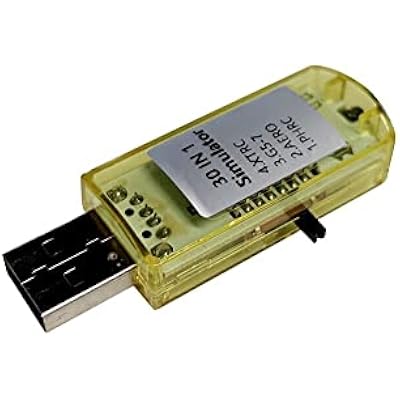
Pctech 22 in 1 RC Flight Simulator Adapter for G7 Phoenix 5.0 XTR VRC, Flysky Frsky Remote Controller FPV Racing
0 ratings
Write a review
Out of stock
 Imported from USA store
Secured transaction
Ubuy works hard to protect your security and privacy. Our advanced payment security system ensures confidentiality by encrypting your information during transmission using AES (Advanced Encryption Standards) and SSL (Secure Socket Layer) protocols. Your payment details are 100% secure as we do not share your payment details with third party sellers.
Our Top Logistics Partners


Latest 22 In 1 Simulator with standard USB interface

Fast
Shipping

Free
Return*

Secure Packaging

100% Original Products

PCI DSS Compliance

ISO 27001 Certified


Note: Step Down Voltage Transformer required for using electronics products of US store (110-120). Recommended power converters Buy Now.


What Stands Out
Versatile Compatibility
Supports multiple flight simulators including G7, Phoenix, XTR, and VRC, offering flexibility for users with various remote controllers, enhancing the training experience for both beginners and advanced pilots.
Plug-and-Play Setup
Easy installation without complicated software setups, allowing users to quickly connect their Flysky or Frsky remote controllers and start practicing, eliminating barriers for new users.
Realistic Experience
Provides a high-fidelity simulation environment that mimics real-world flying conditions, enabling users to refine their skills in a safe setting, making it ideal for FPV racing enthusiasts.
Product Details
- Supports Esky, Futaba, JR, and FS simulator software for G7 Phoenix 5.0 XTR VRC FPV Racing
- Package includes Aeromodeling USB Analog cable, large round patch cord, small round adapter cable, and Software Disk
- Language options: Chinese, English; compatible with XP, Windows 7
- Transmitter compatibility with WFLY, JR, FUTABA, Walkera, FS, KDS
- Latest 22 In 1 Simulator with standard USB interface, supports G7, PhoenixRC5.0, Reflex XTR, and VRC
- Suitable for RC helicopter, quadcopter, airplane, and FPV, with software download links provided
| Item Weight | 1.2 lbs (540 grams) |
Who Should Buy?

-
Beginner Pilots
Ideal for newcomers wanting to practice flying without risk. It provides a realistic simulation environment for learning.
-
RC Enthusiasts
Perfect for hobbyists who explore various flight simulators. Offers compatibility with multiple remote controllers to enhance experience.
-
FPV Racing Preparers
Great for racers focusing on honing skills. Helps to refine techniques before racing without real-world obstacles.

-
Professional Pilots
Not suitable for professionals needing advanced training. Lacks features required for expert-level flight simulations.
-
Non-tech Users
May confuse users unfamiliar with technology. Setup and calibration can be complicated for those without technical skills.
-
Casual Gamers
Not designed for casual gaming; primarily targets serious RC enthusiasts requiring realistic simulator functions.
Product Description
Pctech 22 in 1 RC Flight Simulator Adapter for G7 Phoenix 5.0 XTR VRC, Flysky Frsky Remote Controller FPV Racing
Have any Query? Chat with us
Customer Questions & Answers
-
Question:
What is the Pctech 22 in 1 RC Flight Simulator Adapter used for?
Answer: The Pctech 22 in 1 RC Flight Simulator Adapter is designed to connect various remote controllers, like Flysky and Frsky, to multiple flight simulators, including the G7 Phoenix 5.0 and XTR VRC. This adaptor allows users to practice flying virtually, which is critical for honing skills in FPV racing and recreational flying. By using this adapter, pilots can experience realistic flying environments and different scenarios, improving their piloting skills without the risks associated with real flights. -
Question:
Is the Pctech adapter compatible with my remote controller?
Answer: Yes, the Pctech 22 in 1 adapter is compatible with a wide range of remote controllers, including those from Flysky and Frsky brands. It's engineered to work seamlessly with various flight simulation software like G7 Phoenix 5.0 and XTR. Always check the compatibility list included with the product or consult the manufacturer's website to ensure that your specific remote controller is supported before use. -
Question:
How do I setup the Pctech 22 in 1 RC Flight Simulator Adapter?
Answer: Setting up the Pctech 22 in 1 adapter is straightforward. Begin by connecting the adapter to your computer via a USB port. Next, link your remote controller to the adapter using the appropriate cable. Once connected, launch your flight simulator software, and follow the specific setup instructions provided by the simulator. This process will generally involve mapping controls to ensure all features of the remote are functional in the simulator environment. -
Question:
Can I use the Pctech adapter with other flight simulation programs?
Answer: Absolutely! The Pctech 22 in 1 RC Flight Simulator Adapter is versatile and can be used with numerous flight simulation programs beyond G7 Phoenix 5.0 and XTR VRC. Some popular simulators include Aerofly RC and RealFlight. Ensure that the simulator software you choose supports external USB controllers, and you'll be able to practice flying models or FPV racing across various simulated scenarios. -
Question:
What benefits does using a flight simulator provide?
Answer: Using a flight simulator with the Pctech adapter offers several advantages. It allows users to practice flying without the risk of damaging actual model aircraft. Additionally, it provides an opportunity to try different flying conditions, learn new maneuvers, and become familiar with flight controls in a safe environment. Many beginners opt for simulators to build confidence before taking to the skies, making it a crucial tool in a pilot's training regimen. -
Question:
Does the adapter support virtual reality (VR) setups?
Answer: The Pctech 22 in 1 adapter is adaptable for use with various gaming setups, including VR if the flight simulator you are using supports VR technology. To experience a fully immersive flying experience, ensure that your setup is compatible with VR headsets and adjust settings in your flight simulation software accordingly. This combination provides a thrilling experience that closely mimics real flying. -
Question:
What is included with the Pctech 22 in 1 RC Flight Simulator Adapter?
Answer: When purchasing the Pctech 22 in 1 RC Flight Simulator Adapter, you typically receive the adapter itself, along with a selection of cables suitable for different remote controls. Some versions may include a user manual detailing how to connect and set up the device. Always confirm the exact contents in the product listing to ensure you have everything needed to begin your flight simulation experience. -
Question:
Is the adapter suitable for beginners?
Answer: Yes, the Pctech 22 in 1 adapter is an excellent choice for beginners venturing into RC flight simulation. It simplifies the connection process between your remote controller and the flight simulation software, allowing novices to quickly learn the basics of flying. Practicing in a simulated environment helps newcomers gain essential skills and confidence before they graduate to actual flying. -
Question:
What kind of user support is available for the Pctech adapter?
Answer: User support for the Pctech 22 in 1 RC Flight Simulator Adapter is generally accessible through multiple channels. You can find resources on the manufacturer’s website, where you might discover FAQs, setup guides, and troubleshooting tips. Additionally, engaging with user communities or forums dedicated to remote control flying can provide real-time advice and solutions for common issues experienced by users of the adapter. -
Question:
Where can I buy the Pctech 22 in 1 RC Flight Simulator Adapter in Turkmenistan?
Answer: You can purchase the Pctech 22 in 1 RC Flight Simulator Adapter from Ubuy in Turkmenistan. Ubuy offers a wide selection of tech products, including RC accessories, ensuring you can find the right version of the adapter that suits your needs. Visit their website to explore your options and make your purchase securely.
HOBBYWING Remote & App Controlled Vehicles Editorial Review
The Pctech 22 in 1 RC Flight Simulator Adapter offers a convenient and affordable solution for connecting your remote controller to a computer for flight simulation. It is compatible with various simulators including G7, Phoenix 5.0, XTR, VRC, and Flysky Frsky. The dongle included in the package allows for communication between the controller and the computer. Customers have reported mixed experiences with this product. On the positive side, many users have found it easy to use and a great tool for learning to fly. The dongle works well with the Phoenix simulator, which is now available for free. The ability to connect a DX7S controller to a PC for playing Phoenix 5.5 has been appreciated by some customers. However, there have been several complaints about the software discs containing viruses and malware. This has led to some customers having to wipe their hard drives to remove the infections. Others have reported that the USB device has a defective switch that fails to stop at each simulator selection. It should be noted that some users have successfully used the dongle with other simulators by using additional software or cables. In summary, the Pctech 22 in 1 RC Flight Simulator Adapter offers a functional solution for connecting remote controllers to a computer for flight simulation. However, the presence of viruses on the software discs and the defective switch are major drawbacks that potential buyers should Consider.
Customer Reviews & Ratings
1 customers ratings
-
5 Star
100%
-
4 Star
0%
-
3 Star
0%
-
2 Star
0%
-
1 Star
0%
Review this product
Share your thoughts with other customers
Pros
- Easy to use
- Works well with Phoenix simulator
- Allows connection of DX7S controller to PC
Cons
- Software discs contain viruses and malware
Product Price History
Important information
- Limitations : For products shipped internationally, please note that any manufacturer warranty may not be valid; manufacturer service options may not be available; product manuals, instructions, and safety warnings may not be in destination country languages; the products (and accompanying materials) may not be designed in accordance with destination country standards, specifications, and labeling requirements; and the products may not conform to destination country voltage and other electrical standards (requiring use of an adapter or converter if appropriate). The recipient is responsible for assuring that the product can be lawfully imported to the destination country. When ordering from Ubuy or its affiliates, the recipient is the importer of record and must comply with all laws and regulations of the destination country.
- Not all the products listed on Ubuy are for sale, as Ubuy is a global search engine. Products are subject to export/trade regulations.
Currently unavailable.
We don't know when or if this item will be back in stock.
This item is not restrict in my country.(Please click on above link if this item is not restrict in your country, So our team will review and allow.)
Secured transaction
Ubuy works hard to protect your security and privacy. Our advanced payment security system ensures confidentiality by encrypting your information during transmission using AES (Advanced Encryption Standards) and SSL (Secure Socket Layer) protocols. Your payment details are 100% secure as we do not share your payment details with third party sellers.
Our Top Logistics Partners
Fastest cross-border delivery
Features & Benefits
- Features comprehensive software support
- Compatible with multiple transmitter brands
- Suitable for RC helicopters, quadcopters, airplanes, and FPV
- Includes necessary cables for easy setup
- Comes with a free gift: Software Disk