- Home Page /
- Office Products /
- Office Electronics /
- Printers & Accessories /
- Printer Parts & Accessories /
- Printer Ink & Toner /
- Toner Cartridges /
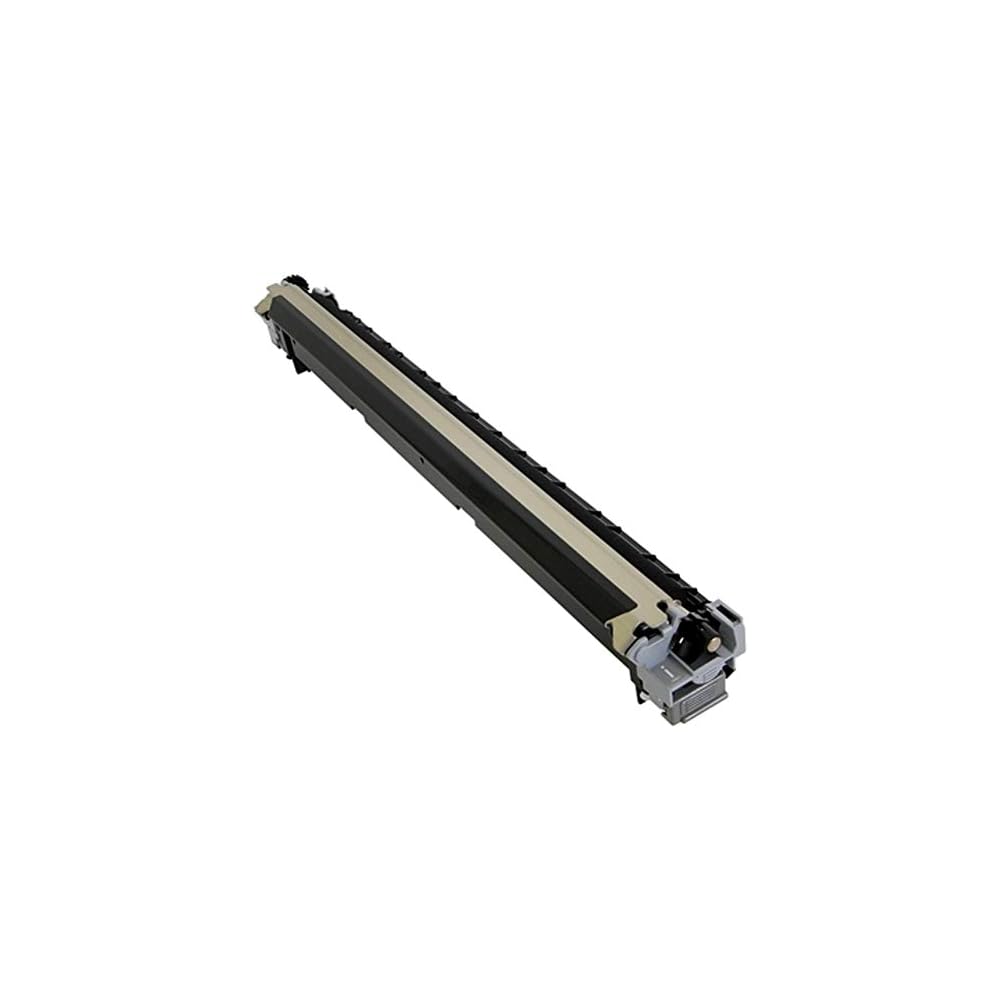
- KYOCERA 1702NL7US0 Model MK-7107 Maintenance ...
0 ratings






Item #:
13039678
KYOCERA 1702NL7US0 Model MK-7107 Maintenance Kit for use Copystar CS-3010i, CS-3510i, TASKalfa 3010i and 3510i Multifunctional Printers; Up to 600000
Item #:
13039678
TMT 3787
Price Details
Excluding Shipping & Custom charges ( Shipping and custom charges will be calculated on checkout )
*All items will import from US
0 ratings
Write a review
In stock
 Imported from USA store
QTY:
Only 9 items left in stock.
Order now and get it around Thursday, July 02
Secured transaction
Ubuy works hard to protect your security and privacy. Our advanced payment security system ensures confidentiality by encrypting your information during transmission using AES (Advanced Encryption Standards) and SSL (Secure Socket Layer) protocols. Your payment details are 100% secure as we do not share your payment details with third party sellers.
Our Top Logistics Partners


Fast
Shipping

Free
Return*

Secure Packaging

100% Original Products

PCI DSS Compliance

ISO 27001 Certified


Note: Step Down Voltage Transformer required for using electronics products of US store (110-120). Recommended power converters Buy Now.


What Stands Out
High Page Yield
Delivers an impressive yield of up to 600,000 pages at 5% average coverage, ensuring reduced frequency of replacements and lower overall printing costs for high-volume environments.
Compatibility
Designed specifically for Copystar CS-3010i, CS-3510i, and TASKalfa series printers, providing seamless integration and optimal performance, enhancing overall productivity and reliability in the workplace.
Easy Installation
Features a user-friendly design that simplifies installation, allowing users to quickly replace the kit without requiring technical expertise, minimizing downtime and maximizing operational efficiency.
Product Details
- Compatible with Kyocera/Copystar CS-3010i, CS-3510i, TASKalfa 3010i and 3510i Multifunctional Printers
- Yields up to 600,000 pages at 5% average coverage
- Includes (1) Drum Unit DK-7105, (1) Developer Unit DV-7105, (1) Transfer Roller Assembly TR-7105, and (1) Fuser Unit FK-7107
- Maintenance kit for prolonged printer functionality
- Genuine Kyocera maintenance kit for reliable performance
- Ensures optimal print quality and efficiency
Product Technical Details
| Manufacturer | KYOCERA |
| Brand | KYOCERA |
| Item Weight | 2.2 pounds |
| Package Dimensions | 0.39 x 0.39 x 0.39 inches |
| Item model number | MK-7107 |
| Manufacturer Part Number | 1702NL7US0 |
Who Should Buy?

-
High Volume Users
Ideal for offices with extensive printing needs, offering a high yield of up to 600,000 pages.
-
Multifunction Printer Owners
Perfect for users of Copystar CS-3010i and CS-3510i, ensuring optimal performance and maintenance.
-
Cost-Conscious Businesses
A cost-effective solution for businesses looking to reduce maintenance expenses over a significant print volume.

-
Occasional Users
Not suitable for users with low printing needs, as the yield far exceeds their requirements.
-
Non-Compatible Printers
Users with different printer models will find this kit ineffective and incompatible with their devices.
-
Budget Constraints
Businesses with strict budgets may find this maintenance kit costlier than simpler, lower-yield alternatives.
Product Description
About This Item
Introducing the Kyocera 1702NL7US0 Model MK-7107 Maintenance Kit, the ultimate maintenance solution for your KyoceraCopystar CS-3010i, CS-3510i, TASKalfa 3010i, and 3510i Multifunctional Printers. This maintenance kit is designed to keep your printer running smoothly and efficiently, ensuring maximum uptime for your business. With a generous yield of up to 600,000 pages at 5% average coverage, you can rest assured that this maintenance kit will last for a long time, minimizing the need for frequent replacements. This not only saves you money but also reduces the hassle of constantly monitoring your printer's performance. The Kyocera 1702NL7US0 Maintenance Kit is specifically engineered to deliver exceptional print quality and reliability.
It includes all the necessary components to ensure optimal performance, such as a fuser unit, transfer roller, and paper feed rollers. By replacing these critical parts, your printer will continue to produce sharp and professional-looking documents. Why risk downtime and costly repairs when you can proactively maintain your printer with the Kyocera 1702NL7US0 Maintenance Kit? By regularly replacing worn-out components, you can prevent potential issues and extend the lifespan of your printer. It's a smart investment that pays off in the long run. Ensure smooth and uninterrupted printing operations with the Kyocera 1702NL7US0 Model MK-7107 Maintenance Kit.
Order yours today and experience the difference in performance and reliability.
Have any Query? Chat with us
Customer Questions & Answers
-
Question:
What is the purpose of the KYOCERA MK-7107 Maintenance Kit?
Answer: The KYOCERA MK-7107 Maintenance Kit is designed to ensure optimal performance and longevity of your Copystar CS-3010i, CS-3510i, TASKalfa 3010i, and 3510i multifunctional printers. This kit includes essential components such as rollers and replacement parts that help maintain print quality and operational efficiency. Regularly using this maintenance kit can prevent common issues such as paper jams, misfeeds, and substandard print output, ultimately enhancing your printing experience. -
Question:
How often should I replace the KYOCERA MK-7107 Maintenance Kit?
Answer: The KYOCERA MK-7107 Maintenance Kit should typically be replaced after printing approximately 600,000 pages, depending on your printing volume and usage patterns. Monitoring your printer's performance can provide insights into when replacement is necessary. For example, if you notice declining print quality or frequent operational interruptions, it may indicate that the maintenance kit needs replacement sooner than the maximum recommended threshold. -
Question:
Can I install the KYOCERA MK-7107 Maintenance Kit myself?
Answer: Yes, the installation of the KYOCERA MK-7107 Maintenance Kit can be done by the user. The kit usually comes with clear instructions for replacing each component, making it straightforward. For instance, if you're experiencing frequent paper jams, following the installation guide can help you replace rollers effectively, thereby alleviating the issue. However, if you're unsure, consulting a professional may provide additional peace of mind. -
Question:
Will the KYOCERA MK-7107 Maintenance Kit improve print quality?
Answer: Absolutely. Replacing the KYOCERA MK-7107 Maintenance Kit can significantly enhance print quality. As the rollers and other components wear down over time, you may notice streaks, faded prints, or inconsistencies in color. By regularly maintaining your printer with this kit, you not only resolve existing quality issues but also prolong the life of your machine, resulting in vibrant, sharp prints for all your documents. -
Question:
What components are included in the KYOCERA MK-7107 Maintenance Kit?
Answer: The KYOCERA MK-7107 Maintenance Kit typically includes essential components like transfer roller, fuser unit, and other critical parts that facilitate smooth operation. These components work together to ensure that your printer performs efficiently, reducing the likelihood of jams and facilitating better ink transfer. For instance, replacing the transfer roller can resolve issues related to uneven printing, resulting in a professional finish. -
Question:
Is the KYOCERA MK-7107 Maintenance Kit compatible with other printer models?
Answer: The KYOCERA MK-7107 Maintenance Kit is specifically designed for use with Copystar CS-3010i, CS-3510i, TASKalfa 3010i, and 3510i multifunctional printers. While other Kyocera printers may require different maintenance kits, ensuring compatibility is crucial. Using the correct kit not only optimizes performance but also avoids potential damage to your printer from incompatible parts. -
Question:
How do I know when it's time to replace the maintenance kit?
Answer: Signs that it's time to replace the KYOCERA MK-7107 Maintenance Kit include diminished print quality, frequent paper jams, and unusual noises during operation. Additionally, many printers have built-in alerts that notify users when maintenance is due. Keeping an eye on these indicators can help maintain your printer in peak condition and ensure that your printing tasks are completed smoothly without interruption. -
Question:
What are the benefits of using genuine KYOCERA parts?
Answer: Using genuine KYOCERA parts like the MK-7107 Maintenance Kit is essential for optimal performance and reliability. These components are specifically engineered to work seamlessly with your printer, ensuring maximum efficiency and preventing potential breakdowns caused by inferior products. For instance, using genuine parts reduces the risk of malfunction and contributes significantly to the overall lifespan of the printer. -
Question:
Can I use aftermarket maintenance kits instead of the KYOCERA MK-7107?
Answer: While aftermarket maintenance kits may be available, it's generally recommended to use the KYOCERA MK-7107 Maintenance Kit for the best results. Aftermarket options may not meet the same standards of quality or compatibility, leading to subpar performance or even damage to your printer. By investing in authentic parts, you can ensure that your printer remains reliable and delivers consistent results. -
Question:
Where can I buy the KYOCERA MK-7107 Maintenance Kit in Turkmenistan?
Answer: You can conveniently purchase the KYOCERA MK-7107 Maintenance Kit from Ubuy in Turkmenistan. Ubuy offers a wide selection of printer maintenance kits, ensuring you get genuine products that match your model’s specifications. Their platform is user-friendly, making it easy to find and order the kit needed to keep your Copystar or TASKalfa printer operating smoothly.
KYOCERA Toner Cartridges MK-7107 Editorial Review
No editorial reviews found
Customer Reviews & Ratings
3 customers ratings
-
5 Star
100%
-
4 Star
0%
-
3 Star
0%
-
2 Star
0%
-
1 Star
0%
Review this product
Share your thoughts with other customers
Pros
- High-quality printing
- Durable and long-lasting
- Easy to install
- Compatible with multiple models
- Reliable performance
Cons
- Slightly heavier than other kits.
Product Price History
Important information
- Limitations : For products shipped internationally, please note that any manufacturer warranty may not be valid; manufacturer service options may not be available; product manuals, instructions, and safety warnings may not be in destination country languages; the products (and accompanying materials) may not be designed in accordance with destination country standards, specifications, and labeling requirements; and the products may not conform to destination country voltage and other electrical standards (requiring use of an adapter or converter if appropriate). The recipient is responsible for assuring that the product can be lawfully imported to the destination country. When ordering from Ubuy or its affiliates, the recipient is the importer of record and must comply with all laws and regulations of the destination country.
- Not all the products listed on Ubuy are for sale, as Ubuy is a global search engine. Products are subject to export/trade regulations.
TMT 3787
Order now and get it around Thursday, July 02
This item is not restrict in my country.(Please click on above link if this item is not restrict in your country, So our team will review and allow.)
QTY:
Only 9 items left in stock.
Secured transaction
Ubuy works hard to protect your security and privacy. Our advanced payment security system ensures confidentiality by encrypting your information during transmission using AES (Advanced Encryption Standards) and SSL (Secure Socket Layer) protocols. Your payment details are 100% secure as we do not share your payment details with third party sellers.
Our Top Logistics Partners
Fastest cross-border delivery