- Home Page /
- Electronics /
- Computer Accessories /
- Computer Accessories & Peripherals /
- Cables & Accessories /
- Cables & Interconnects /
- USB Cables /
- cablecc NVME PCI-E4.0 M.2 M-Key 2230 to Oculi...
0 ratings






Item #:
90653180
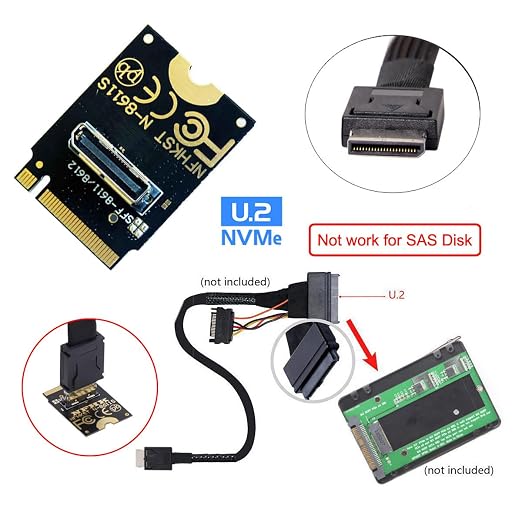
cablecc NVME PCI-E4.0 M.2 M-Key 2230 to Oculink SFF-8612 SFF-8611 Vertical Host Adapter for NVME U.2 SSD eGPU
90% of respondents would recommend this to a friend
Item #:
90653180
TMT 106
Price Details
Excluding Shipping & Custom charges ( Shipping and custom charges will be calculated on checkout )
*All items will import from US
In stock
 Imported from USA store
QTY:
Only 3 items left in stock.
Order now and get it around Friday, September 25
Secured transaction
Ubuy works hard to protect your security and privacy. Our advanced payment security system ensures confidentiality by encrypting your information during transmission using AES (Advanced Encryption Standards) and SSL (Secure Socket Layer) protocols. Your payment details are 100% secure as we do not share your payment details with third party sellers.
Our Top Logistics Partners


Expand your system effortlessly with high-speed connectivity – up to 64Gbps!

Fast
Shipping

Free
Return*

Secure Packaging

100% Original Products

PCI DSS Compliance

ISO 27001 Certified



Note: Step Down Voltage Transformer required for using electronics products of US store (110-120). Recommended power converters Buy Now.


What Stands Out
High-Speed Interface
Utilizing PCI-E 4.0 technology, this adapter delivers exceptional data transfer rates, enhancing performance for NVME U.2 SSDs and providing a seamless experience for demanding applications.
Compact Design
The small M.2 2230 form factor allows for easy integration into space-constrained systems without compromising performance, making it ideal for compact builds and eGPU setups.
Robust Compatibility
Designed for versatility, this adapter supports both SFF-8612 and SFF-8611 connectors, ensuring compatibility with a wide range of SSDs and host systems for enhanced usability.
Product Details
| Connector Type | Sff-8612 Sff-8611 |
| Cable Type | PCI-E4.0 |
| Compatible Devices | for NVME U.2 SSD eGPU |
| Other Special Features of the Product | PCI-E4.0 |
| Compatible Phone Models | No Compatible Phone Models |
| Connector Gender | Male-to-Female |
| Data Transfer Rate | 64 gigabits_per_second |
| Number of Pins | 67 |
| Frequency | 64 GHz |
| Unit Count | 1 Count |
| Number of Items | 1 |
| Brand Name | cablecc |
| Model | SF-023-2230MM-CC |
| Manufacturer | cablecc |
| Part Number | SF-023-2230MM-CC |
| Recommended Uses For Product | Connecting NVMe U.2 SSDs and eGPU graphics cards to host adapters via OCuLink interface |
| Color | Black 2230 |
| Brand | cablecc |
| Special Feature | PCI-E4.0 |
| Item Weight | 0.2 lbs (90 grams) |
Who Should Buy?

-
Gamers
Perfect for gamers wanting to connect NVMe SSDs to external GPUs, enhancing gaming performance and load times.
-
Content Creators
Ideal for video editors and graphic designers needing high-speed data transfer from NVMe SSDs to workstations.
-
Tech Enthusiasts
Great for tech enthusiasts looking to optimize their setups with cutting-edge NVMe and eGPU technology.

-
Casual Users
May not be suitable for casual users who don’t require high-speed storage capabilities or external GPU setups.
Product Description
Have any Query? Chat with us
Customer Questions & Answers
-
Question:
What does the Cablecc PCI-E4.0 M.2 M-Key to Oculink Host Cable do?
Answer: The Cablecc PCI-E4.0 M.2 M-Key to Oculink Host Cable is designed to connect an NVMe U.2 SSD to an Oculink host interface, enabling high-speed data transfer rates crucial for demanding applications. This cable is especially beneficial for users looking to enhance their storage performance for gaming, video editing, and other data-intensive tasks. By using this cable, you can seamlessly integrate powerful U.2 SSDs into systems that support Oculink, thereby unlocking rapid access to large files and reducing load times. -
Question:
Is this cable compatible with all NVMe U.2 SSDs?
Answer: While the Cablecc PCI-E4.0 M.2 M-Key to Oculink Host Cable is designed to work with most NVMe U.2 SSDs, compatibility can vary depending on specific SSD models and manufacturer configurations. It is essential to ensure that your U.2 SSD is compatible with the M.2 M-Key interface. This will help avoid any potential issues and enable the optimal performance of your SSD in data-intensive applications like gaming or video production. -
Question:
Can I use this cable to connect an eGPU to my laptop?
Answer: Yes, the Cablecc PCI-E4.0 M.2 M-Key to Oculink Host Cable can facilitate the connection of an external GPU (eGPU) setup to a laptop that supports M.2 NVMe slots. This connection allows for enhanced graphical performance and is particularly useful for gaming and graphic design tasks. Ensure that your laptop's BIOS and software settings support eGPU configurations for a successful setup. -
Question:
What lengths are available for this cable?
Answer: The Cablecc PCI-E4.0 M.2 M-Key to Oculink Host Cable comes in a 15cm length. This length is well-suited for a variety of internal or external setups without excessive slack. A shorter cable can help maintain clean cable management and improve airflow within your computer case, making it ideal for high-performance builds where space is a premium. -
Question:
What are the advantages of using PCI-E 4.0 with this cable?
Answer: Utilizing PCI-E 4.0 with this cable significantly increases data transfer speeds compared to its predecessors, allowing for improved performance in data-heavy applications. This is particularly important for tasks like 4K video editing or gaming, where rapid data access is essential. By leveraging the high bandwidth capabilities of PCI-E 4.0, users can achieve superior responsiveness and faster loading times when using U.2 SSDs. -
Question:
Is this cable plug-and-play, or do I need to configure any settings?
Answer: The Cablecc PCI-E4.0 M.2 M-Key to Oculink Host Cable is generally plug-and-play, meaning that once connected, it should be recognized by the system without additional configurations. However, depending on your hardware setup, you might need to tweak BIOS settings to ensure proper detection of connected devices. This minimal setup process ensures quick and straightforward installation for users looking to upgrade their systems efficiently. -
Question:
What devices can I connect using this cable?
Answer: This cable is primarily intended for connecting NVMe U.2 SSDs to Oculink interfaces found in various motherboards and external enclosures. You can also use it for high-performance storage expansions in laptops that support NVMe connections. This versatility makes it an excellent choice for customizing computers for gaming, graphic design, or performance benchmarking, facilitating enhanced data access speeds. -
Question:
Will this cable work with my existing hardware setup?
Answer: To determine if the Cablecc PCI-E4.0 M.2 M-Key to Oculink Host Cable is suitable for your hardware, check the specifications of your motherboard or host device to ensure compatibility with the M.2 NVMe interface and Oculink. Most modern systems designed for high-performance tasks will support this cable, allowing users to upgrade storage solutions efficiently and effectively. -
Question:
How do I maintain this cable for optimal performance?
Answer: To maintain the Cablecc PCI-E4.0 M.2 M-Key to Oculink Host Cable, avoid excessive bending or twisting that may damage the connectors or internal wires. Ensure that the cable is securely connected to both the SSD and the motherboard to prevent data loss during transfers. Regularly check for dust and debris in the connections to maintain a clean and efficient data pathway for your high-speed storage. -
Question:
Where can I buy the Cablecc PCI-E4.0 M.2 M-Key to Oculink SFF-8612 SFF-8611 Host Cable in Turkmenistan?
Answer: You can purchase the Cablecc PCI-E4.0 M.2 M-Key to Oculink SFF-8612 SFF-8611 Host Cable from Ubuy in Turkmenistan. Ubuy offers a range of electronic components and accessories, making it a reliable choice for sourcing quality cables and connectors. Simply visit their website, search for the cable, and you’ll find options tailored to your needs.
cablecc USB Cables Editorial Review
No editorial reviews found
Customer Reviews & Ratings
2 customers ratings
-
5 Star
100%
-
4 Star
0%
-
3 Star
0%
-
2 Star
0%
-
1 Star
0%
Review this product
Share your thoughts with other customers
Pros
- Supports NVMe U.2 SSDs
- Compatible with PCI-E 4.0
- Easy installation process
- Vertical design saves space
- Good data transfer speeds
Cons
- Limited compatibility with devices
Platform Trust & Buyer Confidence

JK
Jasmin
Verified buyer
“Great products and very good service: very easy and very fast international delivery.”
9 September 2026 · via Trustpilot
AG
Anke
Verified buyer
“Wonderful online shopping experience, smooth transaction from the start. Payment method works conveniently and delivery is unexpectedly fast and reliable. You go the extra mile for service. What makes this even more amazing, you deliver to Namibia. I will remain a happy Ubuy customer and will increase my purchases for sure! Thank you!”
10 September 2026 · via Trustpilot
H
Hazel
Verified buyer
“Very easy to find the products what you need, and so fast delivery, that’s why I highly recommended to others costumers to used ubuy.”
10 September 2026 · via Trustpilot
O
Opaleye
Verified buyer
“I received exactly what I ordered I was skeptical about your site because that was my first time to order. But the order came timely and neatly packaged. I was not disappointed. Thank you.”
11 September 2026 · via Trustpilot
AC
Adele
Verified buyer
“Easy to find and order what you want on the website. Delivery is quick to the UK”
8 September 2026 · via Trustpilot
Secure Checkout
Global Delivery
Easy Returns
Genuine Products
Product Price History
Important information
- Limitations : For products shipped internationally, please note that any manufacturer warranty may not be valid; manufacturer service options may not be available; product manuals, instructions, and safety warnings may not be in destination country languages; the products (and accompanying materials) may not be designed in accordance with destination country standards, specifications, and labeling requirements; and the products may not conform to destination country voltage and other electrical standards (requiring use of an adapter or converter if appropriate). The recipient is responsible for assuring that the product can be lawfully imported to the destination country. When ordering from Ubuy or its affiliates, the recipient is the importer of record and must comply with all laws and regulations of the destination country.
- Not all the products listed on Ubuy are for sale, as Ubuy is a global search engine. Products are subject to export/trade regulations.
TMT 106
Order now and get it around Friday, September 25
This item is not restrict in my country.(Please click on above link if this item is not restrict in your country, So our team will review and allow.)
QTY:
Only 3 items left in stock.
Secured transaction
PCI DSS compliant and ISO 27001:2022 certified, with encrypted payments and full buyer protection on every order.
Our Top Logistics Partners
Fastest cross-border delivery
Features & Benefits
- Connects one SSD or eGPU Graphics Card via optional cable.
- Transmits PCI Express 4.0 signals using NVMe protocol.
- Data transfer rate of up to 64Gbps.
- Supports NVM Express (NVMe) 1.2 standards.
- Expands the 2230 M-Key system with an additional SFF-8612 oculink interface.
- Seamlessly upgrade your setup for enhanced performance.
Ubuy Assurance
Experience worry-free shopping with 100% original products, PCI DSS-compliant payment security, ISO 27001-certified data protection, the fastest cross-border delivery, free returns *, and secure packaging on every order.