- Home Page /
- Office Products /
- Office Electronics /
- Scanner & Accessories /
- Accessories /
- Waste Ink Pad Replacement Maintenance Box for...
0 ratings


Item #:
116584276
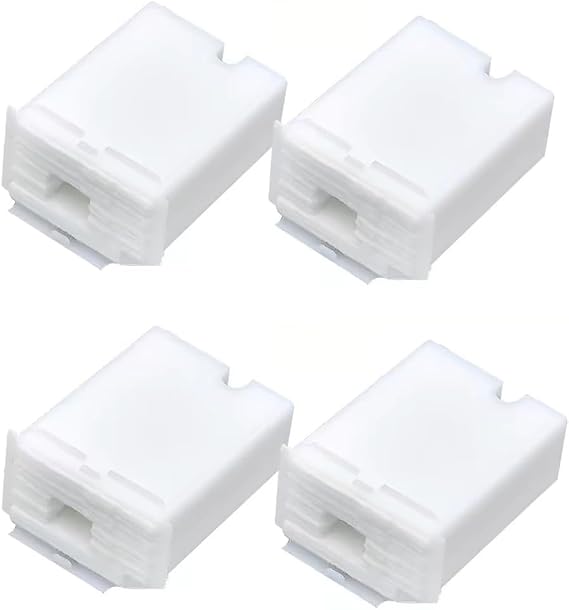
Waste Ink Pad Replacement Maintenance Box for ET-2803 ET-2800
83% of respondents would recommend this to a friend
Item #:
116584276
TMT 119
Price Details
Excluding Shipping & Custom charges ( Shipping and custom charges will be calculated on checkout )
*All items will import from US
0 ratings
Write a review
In stock
 Imported from USA store
QTY:
Order now and get it around Wednesday, September 23
Secured transaction
Ubuy works hard to protect your security and privacy. Our advanced payment security system ensures confidentiality by encrypting your information during transmission using AES (Advanced Encryption Standards) and SSL (Secure Socket Layer) protocols. Your payment details are 100% secure as we do not share your payment details with third party sellers.
Our Top Logistics Partners


Super absorbent sponge and high strength tank body holds more waste ink strongly.

Fast
Shipping

Free
Return*

Secure Packaging

100% Original Products

PCI DSS Compliance

ISO 27001 Certified



Note: Step Down Voltage Transformer required for using electronics products of US store (110-120). Recommended power converters Buy Now.


What Stands Out
Compatible Design
Specifically designed for various Epson models, ensuring seamless integration and compatibility, preventing any print quality issues typically associated with waste ink pad problems.
Cost-Effective Solution
Includes four replacement pads, offering an economical and sustainable approach to printer maintenance, saving users money on frequent replacements and potential service calls.
User-Friendly
Simple installation process allows users to replace the maintenance box without professional assistance, empowering individuals to maintain their printers conveniently and efficiently.
Product Details
| Scanner Type | Document |
| Connection Type | Wi-Fi |
| Resolution | 600 dpi |
| Media Type | USB |
| Item Weight | 0.54 kg |
| Brand | Repairolles |
| UPC | 763527627135 |
| Manufacturer | Repairolles |
| Connectivity Technology | Wi-Fi |
| Item Highlight | ET-2711 ET-2720 ET-4700 L3110 L3210 L3150 L3250 L3218 L3219 L1110 L1118 L5190 L5198uff084PCS) |
Who Should Buy?

-
Frequent Printer Users
Ideal for users who print regularly and need reliable maintenance to prevent printer errors and prolong device life.
-
Home Office Setup
Perfect for home based businesses where consistent print quality and maintenance are essential for professional output.
-
Budget-Conscious Consumers
Cost-effective solution for individuals looking to save money on expensive printer repairs and replacement parts.

-
Occasional Printers
Not suitable for those who print infrequently, as the need for maintenance may not arise often.
Product Description
Waste Ink Pad Replacement Maintenance Box for ET-2803 ET-2800
Have any Query? Chat with us
Customer Questions & Answers
-
Question:
What is a Waste Ink Pad Replacement Maintenance Box?
Answer: A Waste Ink Pad Replacement Maintenance Box is an essential component for Epson printers that collects excess ink during the printing process. Over time, these pads become saturated with ink, which can affect printer performance. Replacing the maintenance box ensures that your printer operates smoothly and prevents leaks or damage caused by an overflow of ink, keeping your printing environment clean. -
Question:
Which Epson printer models are compatible with this maintenance box?
Answer: This Waste Ink Pad Replacement Maintenance Box is compatible with several Epson models, including ET-2803, ET-2800, ET-2711, ET-2720, ET-4700, L3110, L3210, L3150, L3250, L3218, L3219, L1110, L1118, and L5190. It's important to check compatibility with your model to ensure proper functioning, as using an incompatible box could lead to printer issues or poor printing quality. -
Question:
How often should I replace the Waste Ink Pad Replacement Maintenance Box?
Answer: The frequency of replacement primarily depends on your printing habits. If you print frequently or use large volumes of ink, you may need to replace the maintenance box more often. Regularly monitoring your printer’s status can help you identify when a replacement is needed, ensuring optimal performance and preventing potential issues that arise from a full ink pad. -
Question:
Can I clean and reuse the Waste Ink Pad instead of replacing it?
Answer: While some users may attempt to clean and reuse the Waste Ink Pad, this practice is generally not recommended. Cleaning can be messy and may not thoroughly remove all ink, potentially leading to further operational issues. Replacing the Waste Ink Pad ensures optimal performance and minimizes risks associated with improper maintenance. -
Question:
What symptoms indicate that I need a new Waste Ink Pad Replacement Maintenance Box?
Answer: Key symptoms that indicate the need for a new maintenance box include ink overflow messages on your printer, visible ink leakage, or a sudden drop in print quality. If you notice any of these issues, it's crucial to replace the maintenance box promptly to avoid damage to your printer and ensure consistent print quality. -
Question:
How do I install the Waste Ink Pad Replacement Maintenance Box?
Answer: Installation of the Waste Ink Pad Replacement Maintenance Box is straightforward. Begin by powering off your printer and unplugging it for safety. Access the maintenance box, gently remove the old box, and carefully slot in the new one. Follow any manufacturer-specific instructions to ensure proper installation, which restores functionality and keeps your printer in top shape. -
Question:
Is there a risk of damaging my printer if I don’t replace the maintenance box?
Answer: Yes, failing to replace the maintenance box can lead to significant damage. Over time, a full or overflowing ink pad can cause leaks, resulting in ink damage to internal components of your printer. Regular replacements are essential for maintaining the health of your device and ensuring reliable performance with high-quality prints. -
Question:
Where can I buy the Waste Ink Pad Replacement Maintenance Box for my Epson printer?
Answer: You can purchase the Waste Ink Pad Replacement Maintenance Box for Epson printers from Ubuy in Turkmenistan. Ubuy offers a wide selection of maintenance boxes compatible with various Epson models, ensuring that you can find the right replacement to keep your printer functioning efficiently. -
Question:
What should I do with the old Waste Ink Pad Replacement Maintenance Box?
Answer: Once you replace your old Waste Ink Pad Replacement Maintenance Box, it’s important to dispose of it properly due to the ink residue. Many local waste management programs may have specific guidelines for the disposal of such items. Alternatively, check with local recycling centers or facilities that handle electronic waste for appropriate disposal methods, promoting environmental responsibility. -
Question:
Are there any indicators on the printer that suggest the maintenance box is full?
Answer: Yes, most Epson printers provide alerts when the Waste Ink Pad Replacement Maintenance Box is nearing capacity or full. Look for notifications on your printer's display or accompanying pop-up messages on your computer. Promptly addressing these alerts by replacing the box will help maintain optimal printer performance.
Repairolles Accessories Editorial Review
The Waste Ink Pad Replacement Maintenance Box for ET-2803 ET-2800 is an essential accessory for maintaining the efficiency of your printer. This product's compatibility with popular models like the ET-2711, ET-2720, and ET-4700 ensures that users can easily replace their waste ink pads. Highlighting a weight of 0.54 kg, it is not only portable but also designed for easy installation without professional help. Customers appreciate the Wi-Fi connectivity feature, which allows for seamless integration into their existing setup. This maintenance box is specifically engineered to enhance your printer's performance, ensuring longevity and optimal output.
Customer Reviews & Ratings
1 customers ratings
-
5 Star
100%
-
4 Star
0%
-
3 Star
0%
-
2 Star
0%
-
1 Star
0%
Review this product
Share your thoughts with other customers
Pros
- Compatible with multiple Epson printer models
- Lightweight at 0.54 kg for easy handling
- Includes a set of 4 maintenance boxes
- Designed for simple DIY installation
- Optimizes printer longevity and performance
Cons
- Installation may require basic technical skills
Platform Trust & Buyer Confidence

JK
Jasmin
Verified buyer
“Great products and very good service: very easy and very fast international delivery.”
9 September 2026 · via Trustpilot
AG
Anke
Verified buyer
“Wonderful online shopping experience, smooth transaction from the start. Payment method works conveniently and delivery is unexpectedly fast and reliable. You go the extra mile for service. What makes this even more amazing, you deliver to Namibia. I will remain a happy Ubuy customer and will increase my purchases for sure! Thank you!”
10 September 2026 · via Trustpilot
H
Hazel
Verified buyer
“Very easy to find the products what you need, and so fast delivery, that’s why I highly recommended to others costumers to used ubuy.”
10 September 2026 · via Trustpilot
O
Opaleye
Verified buyer
“I received exactly what I ordered I was skeptical about your site because that was my first time to order. But the order came timely and neatly packaged. I was not disappointed. Thank you.”
11 September 2026 · via Trustpilot
AC
Adele
Verified buyer
“Easy to find and order what you want on the website. Delivery is quick to the UK”
8 September 2026 · via Trustpilot
Secure Checkout
Global Delivery
Easy Returns
Genuine Products
Product Price History
Important information
- Limitations : For products shipped internationally, please note that any manufacturer warranty may not be valid; manufacturer service options may not be available; product manuals, instructions, and safety warnings may not be in destination country languages; the products (and accompanying materials) may not be designed in accordance with destination country standards, specifications, and labeling requirements; and the products may not conform to destination country voltage and other electrical standards (requiring use of an adapter or converter if appropriate). The recipient is responsible for assuring that the product can be lawfully imported to the destination country. When ordering from Ubuy or its affiliates, the recipient is the importer of record and must comply with all laws and regulations of the destination country.
- Not all the products listed on Ubuy are for sale, as Ubuy is a global search engine. Products are subject to export/trade regulations.
TMT 119
Order now and get it around Wednesday, September 23
This item is not restrict in my country.(Please click on above link if this item is not restrict in your country, So our team will review and allow.)
QTY:
Secured transaction
PCI DSS compliant and ISO 27001:2022 certified, with encrypted payments and full buyer protection on every order.
Our Top Logistics Partners
Fastest cross-border delivery
Features & Benefits
- Compatible with a wide range of models including L1110 to L5198.
- Easy installation with plug-and-play functionality.
- Features a super absorbent sponge design.
- High strength tank body for increased durability.
- Designed to hold more waste ink effectively.
- Ideal for both personal and professional printing needs.
Ubuy Assurance
Experience worry-free shopping with 100% original products, PCI DSS-compliant payment security, ISO 27001-certified data protection, the fastest cross-border delivery, free returns *, and secure packaging on every order.