- Home Page /
- Electronics /
- Computer Accessories /
- Computer Accessories & Peripherals /
- Input Devices /
- Graphics Tablets /
- Graphics Drawing Tablet, 106 Inch Large Activ...
0 ratings






Item #:
34046511
Graphics Drawing Tablet, 106 Inch Large Active Area with Battery-Free Stylus, 8192 Levels of Pen Pressure and 12 Hot Keys, Compatible with
Item #:
34046511
TMT 185
Price Details
Excluding Shipping & Custom charges ( Shipping and custom charges will be calculated on checkout )
*All items will import from US
14%
In stock
 Imported from USA store
QTY:
Order now and get it around Monday, June 29
Secured transaction
Ubuy works hard to protect your security and privacy. Our advanced payment security system ensures confidentiality by encrypting your information during transmission using AES (Advanced Encryption Standards) and SSL (Secure Socket Layer) protocols. Your payment details are 100% secure as we do not share your payment details with third party sellers.
Our Top Logistics Partners


XOPPOX Graphics Drawing Tablet is compatible with multiple operating systems and software, providing an easy and efficient experience for artists, designers, and online teachers.

Fast
Shipping

Free
Return*

Secure Packaging

100% Original Products

PCI DSS Compliance

ISO 27001 Certified


Note: Step Down Voltage Transformer required for using electronics products of US store (110-120). Recommended power converters Buy Now.


What Stands Out
Large Active Area
The 10 x 6 inch drawing surface provides ample space for creative expression, enhancing your drawing experience whether for art, design, or teaching.
Battery-Free Pen
Experience uninterrupted creativity with the included battery-free pen that offers 8192 pressure levels for precision, responding to every nuance of your drawing.
Multi-Device Compatibility
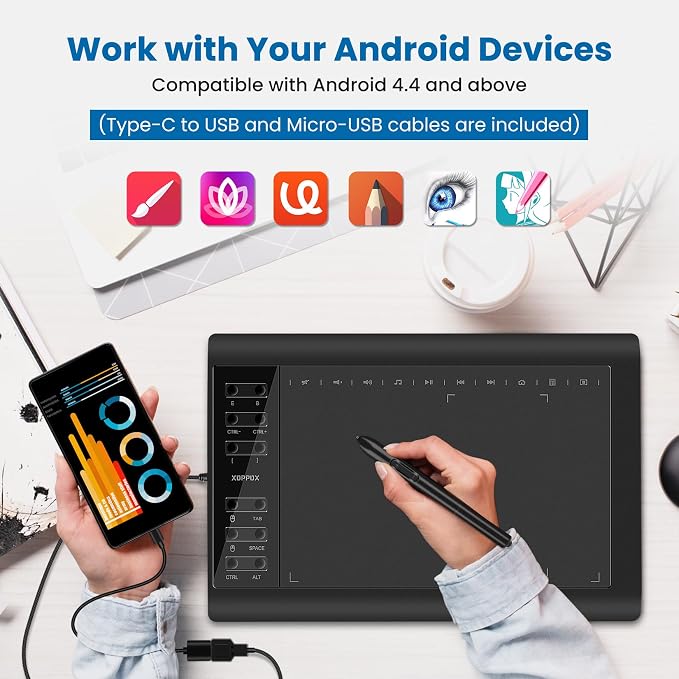
Seamlessly connects to PC, Mac, and Android, making it a versatile choice for artists, designers, and educators across various platforms and applications.
Product Details
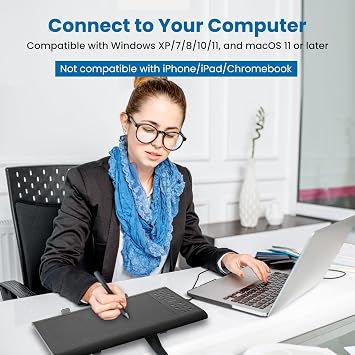
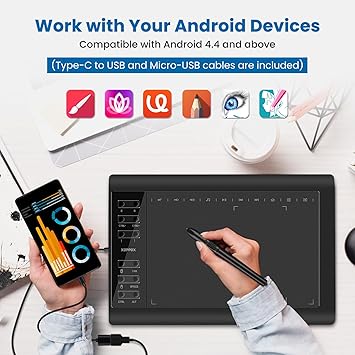
- 【Broad Compatibility】XOPPOX upgraded drawing tablet is compatible with Windows XP/7/8/10/11, Android 4.4 and above, and macOS 11 or later (not compatible with iPhone, iPad, or Chromebook). Note: For Mac users, permissions for Accessibility, Input Monitoring, and Full Disk Access are required in Security & Privacy after installation
- 【No-Battery Pen】The digital drawing tablet comes with a battery-free pen featuring 8192 levels of pressure sensitivity, making lines smoother and more natural. This pen does not need to be charged, so you don’t have to worry about battery power. The package includes 20 replacement nibs
- 【Convenient Shortcut Keys】Designed with 12 customizable shortcut keys and 10 multimedia keys (only compatible with Windows), this drawing pad for pc provides greater convenience and helps improve productivity and efficiency by allowing you to set shortcuts for many different software in the driver settings
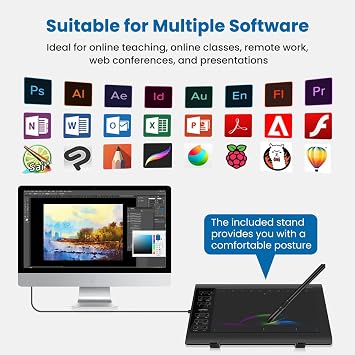
- 【Wide Range of Use】XOPPOX drawing tablet is compatible with office software such as Microsoft Word, Excel, PowerPoint. It is ideal for online teaching, online classes, remote work, web conferences, presentations, and so on. The art tablet is also compatible with most major software, including Photoshop, SAI, FlipaClip, MediBang, Adobe Illustrator, Lightroom, and more
| Brand | XOPPOX |
| Model Name | VIN1060Plus |
| Built-In Media | 1 × XOPPOX drawing tablet, 1 × Battery-free passive pen, 1 × Pen case, 20 × Replacement nibs, 1 × Nib removal tool, 1 × Micro-USB OTG, 1 × Type-C OTG, 1 × Two-finger glove, 1 × Cleaning cloth, 1 × Tablet stand, 1 × User guide. |
| Target Audience | Artist, Content Creator, Designer, Student, Teacher |
| Model Number | cbefe1d4-7323-49c7-8094-fdaf714227e8 |
| Manufacturer | VIN1060Plus |
| Unit Count | 1.0 Count |
| Color | Black |
| Connectivity Technology | USB |
| Pressure Sensitivity | 8192 Levels |
| Operating System | Windows XP/7/8/10/11, Mac OS, Android OS |
| Additional Features | Battery-Free Stylus, 12 Customizable Shortcuts Keys, 5080 LPI, 60° Tilt Support |
| Specific Uses For Product | Digital Drawing/Design/Online Teaching/Mouse Replace |
| Compatible Devices | Compatible with Windows XP/7/8/10/11, Android 4.4 and above, and macOS 11 or later (not compatible with iPhone, iPad, or Chromebook) |
| Native Resolution | 5080 |
| Screen Size | 10 Inches (25.4 cm) |
| Item Weight | 2.65 Pounds (1.2 kg) |
| Item Dimensions L x W | 14.2"L x 9.5"W (36.1 cm) |
| Active Surface Area | 10 inches x 6 inches (25.4 cm) |
| Special Feature | Battery-Free Stylus, 12 Customizable Shortcuts Keys, 5080 LPI, 60° Tilt Support |
Dangerous Goods
To avoid the delay in customs clearance process for Dangerous Goods, the shipment shall be opened at our warehouse facility to check the severity of hazardous components. Please see the list of Dangerous goods here.
What's in the box
1 × XOPPOX drawing tablet, 1 × Battery-free passive pen, 1 × Pen case, 20 × Replacement nibs, 1 × Nib removal tool, 1 × Micro-USB OTG, 1 × Type-C OTG, 1 × Two-finger glove, 1 × Cleaning cloth, 1 × Tablet stand, 1 × User guide.
Who Should Buy?

-
Digital Artists
Perfect for digital artists seeking precision with its 8192 levels of pressure sensitivity and large active area.
-
Design Students
Beneficial for design students who require versatile tools for illustrations and presentations across various platforms.
-
Online Educators
Great for online teachers needing an efficient tool for explaining concepts visually during virtual classes.

-
Casual Users
Not ideal for casual users who only need basic drawing tools without advanced features or sensitivity levels.
-
Professional Illustrators
May not meet the high-end demands of professional illustrators requiring more advanced features than this provides.
-
Non-Tech Savvy
Unsuitable for those uncomfortable with technology, as setup and usage can be complex for beginners.
Product Description
Have any Query? Chat with us
Customer Questions & Answers
-
Question:
What are the key features of the Graphics Drawing Tablet?
Answer: This Graphics Drawing Tablet boasts a large 10.6-inch active area, providing ample space for creativity. It features a battery-free stylus with 8192 levels of pen pressure, allowing for precise strokes and fine detail work. The inclusion of 12 customizable hotkeys enhances workflow efficiency, enabling quick access to your favorite tools or commands. These features make it ideal for digital painting, graphic design, and online teaching, allowing users to express creativity effortlessly. -
Question:
Is the Graphics Drawing Tablet compatible with different operating systems?
Answer: Yes, this Graphics Drawing Tablet is fully compatible with PC, Mac, and Android devices. This versatility means you can use it with a wide range of applications across platforms, whether you're a graphic designer working on a computer or an artist sketching on a tablet. This cross-platform compatibility ensures you can choose your preferred device without worrying about compatibility issues. -
Question:
What applications or software can be used with this tablet?
Answer: The Graphics Drawing Tablet can be utilized with various graphic design and digital art software, including Adobe Photoshop, Illustrator, CorelDRAW, Krita, and more. It is also suitable for online teaching tools like Zoom and Microsoft Teams, allowing educators to present engaging lessons. This compatibility means artists and teachers alike can leverage the tablet's features for their specific needs, whether creating art or teaching courses. -
Question:
How does the battery-free stylus enhance the user experience?
Answer: The battery-free stylus eliminates the hassle of charging, ensuring you're always ready to create. With 8192 levels of pen pressure sensitivity, it offers an incredibly natural drawing experience, mirroring the feel of traditional art supplies. This feature allows artists to vary line thickness and opacity easily, enhancing their artistic expression and efficiency. It's especially beneficial in environments where convenience and a real-time response are critical. -
Question:
Can the tablet be used for gaming purposes?
Answer: While primarily designed for painting and design, the Graphics Drawing Tablet can also be used for gaming, especially for games that support drawing or creative controls. The precision of the stylus can enhance gameplay experiences in art-based games or simulations that require detailed interaction. It's a great addition to the gaming setup for those who enjoy creating as much as playing. -
Question:
What kind of users will benefit most from this drawing tablet?
Answer: This drawing tablet is ideal for a range of users, including professional artists, students, and educators. For artists, the large active area and stylus sensitivity contribute to a seamless creative process. Students can use it for digital art assignments, while teachers can create dynamic lessons in subjects like art or design. Its versatility makes it suitable for anyone looking to enhance their digital creativity. -
Question:
How do the 12 hotkeys improve productivity?
Answer: The 12 customizable hotkeys on the Graphics Drawing Tablet significantly enhance productivity by allowing quick access to frequently used functions and shortcuts. Users can program these hotkeys to specific tools or commands in their software, which streamlines the workflow by reducing the time spent navigating menus. This feature is particularly beneficial for intensive projects where efficiency is crucial, such as during timed tests or tight deadlines. -
Question:
Is it suitable for beginners in digital art?
Answer: Absolutely! The Graphics Drawing Tablet is well-suited for beginners in digital art due to its user-friendly design and responsive stylus. Its large active area helps newcomers get comfortable with drawing without feeling restricted. Additionally, the tablet is compatible with many beginner-friendly software options, making it easier to explore and learn digital art techniques. Beginners can develop their skills effectively in a supportive environment. -
Question:
What is the importance of having 8192 levels of pen pressure?
Answer: Having 8192 levels of pen pressure allows for a highly nuanced drawing experience. It means the tablet can detect subtle variations in pressure, allowing artists to create lines that vary in weight, opacity, and texture. This level of sensitivity is crucial in achieving a natural and expressive art style, similar to traditional painting and drawing techniques, enhancing the overall quality of the finished artwork. -
Question:
Where can I buy the Graphics Drawing Tablet in Turkmenistan?
Answer: You can purchase the Graphics Drawing Tablet from Ubuy, a reliable online platform known for its wide selection of electronic products. Ubuy offers a convenient shopping experience, allowing you to explore various options and make an informed purchase. With a user-friendly interface and detailed product information, Ubuy ensures you can easily find and order the graphics drawing tablet suited to your needs.
XOPPOX Graphics Tablets cbefe1d4-7323-49c7-8094-fdaf714227e8 Editorial Review


If you're in the market for an affordable drawing tablet that's easy to use, give this one a try. While it does have its limitations, overall it's a great investment, and it works with most laptops or desktops. The pen pressure works well and is fun and easy to use for projects. However, beginners might need some practice with the buttons so there can be a little bit of a learning curve.
Customer Reviews & Ratings
1511 customers ratings
-
5 Star
61%
-
4 Star
16%
-
3 Star
10%
-
2 Star
5%
-
1 Star
8%
Review this product
Share your thoughts with other customers
Pros
- Comes with included accessories that hold up well
- Sleek and compact design
- Compatible with most laptops or desktops
- Great for animation or computer art projects
- Pen pressure works well
Cons
- No USB cord
Product Price History
Important information
- Limitations : For products shipped internationally, please note that any manufacturer warranty may not be valid; manufacturer service options may not be available; product manuals, instructions, and safety warnings may not be in destination country languages; the products (and accompanying materials) may not be designed in accordance with destination country standards, specifications, and labeling requirements; and the products may not conform to destination country voltage and other electrical standards (requiring use of an adapter or converter if appropriate). The recipient is responsible for assuring that the product can be lawfully imported to the destination country. When ordering from Ubuy or its affiliates, the recipient is the importer of record and must comply with all laws and regulations of the destination country.
- Not all the products listed on Ubuy are for sale, as Ubuy is a global search engine. Products are subject to export/trade regulations.
TMT 185
Order now and get it around Monday, June 29
This item is not restrict in my country.(Please click on above link if this item is not restrict in your country, So our team will review and allow.)
QTY:
Secured transaction
Ubuy works hard to protect your security and privacy. Our advanced payment security system ensures confidentiality by encrypting your information during transmission using AES (Advanced Encryption Standards) and SSL (Secure Socket Layer) protocols. Your payment details are 100% secure as we do not share your payment details with third party sellers.
Our Top Logistics Partners
Fastest cross-border delivery
Features & Benefits
- Compatible with Windows XP, 7, 8, 10,11. Android 4.4 and above; Mac OS 11 and above
- 8192 levels of pressure sensitivity for smoother and more natural lines
- No battery needed for the pen and includes 20 replacement nibs
- 12 customizable shortcut keys and 10 multimedia keys for improved productivity
- Easy installation process with technical support available
- Compatible with major software like Photoshop, SAI, FlipaClip, and more