0 ratings






Item #:
229881457
HP DeskJet 4327 Wireless All-in-One Color Inkjet Printer, Scanner, Copier, 6 Month Trial of Instant Ink Included, AI-Capable (B3ZF6A)
75% of respondents would recommend this to a friend
Item #:
229881457
TMT 502
Price Details
Excluding Shipping & Custom charges ( Shipping and custom charges will be calculated on checkout )
*All items will import from US
In stock
 Imported from USA store
QTY:
Order now and get it around Thursday, October 08
Secured transaction
Ubuy works hard to protect your security and privacy. Our advanced payment security system ensures confidentiality by encrypting your information during transmission using AES (Advanced Encryption Standards) and SSL (Secure Socket Layer) protocols. Your payment details are 100% secure as we do not share your payment details with third party sellers.
Our Top Logistics Partners


The HP DeskJet 4327 is your perfect companion for basic printing needs, delivering color printing, mobile and wireless options, and an effortless 6-month trial of Instant Ink.

Fast
Shipping

Free
Return*

Secure Packaging

100% Original Products

PCI DSS Compliance

ISO 27001 Certified



Note: Step Down Voltage Transformer required for using electronics products of US store (110-120). Recommended power converters Buy Now.


What Stands Out
Wireless Connectivity
Enjoy hassle-free printing from anywhere in your home or office with seamless wireless connectivity, allowing mobile and tablet compatibility for convenient and flexible usage.
All-in-One Functionality
This versatile device combines printing, scanning, and copying in one compact unit, saving you space and streamlining your workflow for everyday tasks.
Instant Ink Trial
Experience hassle-free printing with a 6-month trial of Instant Ink included, automatically delivering ink when you need it, ensuring you never run out during important projects.
Product Details
| Printer Type | HP Thermal Inkjet |
| Other Special Features of the Product | Wireless; HP Instant Ink eligible; Automatic document feeder; Print from phone or tablet |
| Printer Output Type | Color |
| Item Weight | 10.6 pounds (4.81 kg) |
| Item Dimensions D x W x H | 13.07"D x 16.85"W x 7.87"H (33.2 x 42.8 x 20 cm) |
| Print media | Envelopes, Unknown |
| Scanner Type | Flatbed |
| Maximum Copy Speed Black and White | 6 pages_per_minute |
| Compatible Devices | Laptops, PC, Smartphones |
| Maximum Copies Per Run | Up to 9 copies |
| Ink Color | Black; Cyan; Magenta; Yellow |
| Additional Printer Functions | All In One |
| Compatible Cartridge | NA: HP 68 Black Original Ink Cartridge 7FP21TN; HP 68 Tri-Color Original Ink Cartridge 7FP20TN; HP 68e EvoMore Black Original Ink Cartridge 7FP22TN. AP: HP 68 Black Original Ink Cartridge 7FP21TA; HP 68 Tri-Color Original Ink Cartridge 7FP20TA; HP 68e EvoMore Black Original Ink Cartridge 7FP22TA. EMEA: HP 308 Black Original Ink Cartridge 7FP21UE; HP 308 Tri-Color Original Ink Cartridge 7FP20UE; HP 308e EvoMore Black Original Ink Cartridge 7FP22UE; HP 807 Black Original Ink Cartridge 7FP21ZA; HP 807 Tri-Color Original Ink Cartridge 7FP20ZA. |
| Number of Trays | 1 |
| Processor Count | 1 |
| Color Pages per Minute | 5.5 pages_per_minute |
| B&W Pages per Minute | 8.5 pages_per_minute |
| Initial Page Print Time | 20 seconds |
| Color | White |
| Color Depth | 24 bits |
| Printer Connectivity Type | Apple AirPrint; USB; Wireless (Wi-Fi); Wireless direct printing; Mopria |
| Hardware Interface | USB |
| Total Usb Ports | 1 |
| Maximum Copy Resolution Color | Up to 300 x 300 dpi |
| Maximum Copy Resolution Black and White | Up to 300 x 300 dpi |
| Brand | HP |
| Model Name | HP DeskJet 4327 All-in-One Printer |
| Model Number | 4300 |
| Built-In Media | HP DeskJet 4327 All-in-One Printer; HP 68 Setup Black Cartridge; HP 68 Setup Tri-Color Cartridge; Regulatory flyer; Setup guide; Reference guide; Power cord [For ink volume and page yield information, visit http://hp.com/go/learnaboutsupplies] |
| Model Series | DeskJet |
| Specific Uses For Product | Home |
| UPC | 199764605146 |
| Unit Count | 1 Count |
| Global Trade Identification Number | 00199764605146 |
| Item Type Name | Inkjet printers |
| Manufacturer | HP |
| Maximum Media Size | 8.5 x 11.69 in |
| Maximum Sheet Capacity | 60 |
| Paper Size | 8.5 x 11;8.27 x 11.7;8.5 x 14;7.16 x 10.12; inches |
| Maximum print Resolution Color | Up to 4800 x 1200 optimized dpi color (when printing from a computer on selected HP photo papers and 1200 input dpi) dots_per_inch |
| Maximum Print Resolution Black and White | Up to 1200 x 1200 rendered dpi dots_per_inch |
| Power Consumption | 2.61 watts |
| Duplex | Manual (driver support provided) |
| Connectivity Technology | Apple AirPrint; USB; Wireless (Wi-Fi); Wireless direct printing; Mopria |
| Printing Technology | HP Thermal Inkjet |
| Special Feature | Wireless; HP Instant Ink eligible; Automatic document feeder; Print from phone or tablet |
| Printer Output | Color |
| Maximum Print Speed (Color) | 5.5 pages_per_minute |
| Max Printspeed Monochrome | 8.5 pages_per_minute |
What's in the box
HP DeskJet 4327 All-in-One Printer; HP 68 Setup Black Cartridge; HP 68 Setup Tri-Color Cartridge; Regulatory flyer; Setup guide; Reference guide; Power cord [For ink volume and page yield information, visit http://hp.com/go/learnaboutsupplies]
Who Should Buy?

-
Home Office Users
Ideal for remote workers needing printing, scanning, and copying capabilities in a compact and versatile device.
-
Students
Perfect for academic needs, allowing easy printing of assignments, projects, and study materials from home.
-
Families
Great for families, providing reliable printing solutions for school projects, photos, and everyday documents.

-
High Volume Users
Not suitable for business environments requiring frequent, high-speed printing or large quantities of documents.
Product Description
Have any Query? Chat with us
Customer Questions & Answers
-
Question:
What features does the HP DeskJet 4327 Wireless All-in-One Printer offer?
Answer: The HP DeskJet 4327 is a versatile all-in-one printer that includes printing, scanning, and copying capabilities. It supports wireless connectivity, enabling convenient printing from your smartphone or tablet through Wi-Fi. This model also features AI capabilities which can enhance user experience through smart print management. With the included 6-month trial of HP Instant Ink, users can enjoy hassle-free ink subscriptions that notify you when supplies are low, ensuring you never run out of ink at crucial moments. Ideal for home offices and student use, it caters to various day-to-day printing needs seamlessly. -
Question:
How do I set up the HP DeskJet 4327 for wireless printing?
Answer: To set up the HP DeskJet 4327 for wireless printing, begin by connecting the printer to your Wi-Fi network using the control panel. Access the wireless settings, select your network, and enter the password when prompted. Next, install the HP Smart app on your smartphone or desktop, which will guide you through connecting the printer. Once configured, you can print documents or images directly from your mobile device or computer. This setup is perfect for households, schools, or small businesses where multiple devices are used. -
Question:
What type of ink cartridges does the HP DeskJet 4327 use?
Answer: The HP DeskJet 4327 utilizes HP 67 ink cartridges, which are available in standard and high-yield options. These cartridges are designed to deliver vibrant color prints and sharp black text, making them suitable for both home and office use. The high-yield cartridges offer more pages per cartridge, making them a cost-effective choice for users who print frequently. This is especially beneficial for businesses or students who regularly print assignments, reports, or creative projects. -
Question:
Can I print from my smartphone or tablet using the HP DeskJet 4327?
Answer: Yes, the HP DeskJet 4327 supports mobile printing, allowing you to print directly from your smartphone or tablet. By using the HP Smart app, you can easily connect your mobile device to the printer over Wi-Fi. This feature is ideal for quick print jobs, such as printing out pictures from a family event or sending an important document while on the go. With mobile printing options including AirPrint and Google Cloud Print, it offers great flexibility for users across different platforms. -
Question:
Is the HP DeskJet 4327 compatible with both Windows and Mac operating systems?
Answer: Yes, the HP DeskJet 4327 is compatible with both Windows and Mac operating systems. It supports various versions, providing drivers and software that ensure seamless installation and operation on your devices. This compatibility makes it a suitable choice for users in mixed-OS environments, ensuring everyone in your family or workplace can easily print, scan, or copy from their respective machines. Whether you’re a student working on a Mac or a business professional using a Windows laptop, the DeskJet 4327 has you covered. -
Question:
What is the printing speed of the HP DeskJet 4327?
Answer: The HP DeskJet 4327 has a printing speed of up to 7.5 pages per minute (ppm) for black and around 5.5 ppm for color documents. While these speeds can vary depending on the print settings and complexity of the document, it effectively meets standard home and office needs. This speed is particularly efficient for tasks like printing essays or quick presentations, making it a reliable choice for users who require dependable performance without extended waiting times. -
Question:
What kind of documents can I print with the HP DeskJet 4327?
Answer: The HP DeskJet 4327 can print a variety of documents, including high-quality color images, photos, flyers, and text documents. Its versatile printing capabilities allow you to handle everything from school assignments to business documents with ease. Whether you’re looking to print colorful invitations or sharp black-and-white reports, this printer meets diverse printing needs, making it suitable for students, families, and professionals alike. -
Question:
Does the HP DeskJet 4327 support double-sided printing?
Answer: The HP DeskJet 4327 does not have automatic duplex printing, but you can manually print on both sides of the paper. To do this, you simply need to print the first side, then re-insert the paper to print the other side. This feature can help save paper and is great for users who wish to promote eco-friendliness while printing. It's useful for creating double-sided flyers or handouts when traditional automatic duplexing is not available. -
Question:
Where can I buy the HP DeskJet 4327 Wireless All-in-One Printer?
Answer: You can purchase the HP DeskJet 4327 Wireless All-in-One Printer from Ubuy in Turkmenistan. Ubuy offers a wide range of electronic products, including printers, along with competitive options and easy access for your electronics needs. Their user-friendly website ensures a smooth shopping experience, making it convenient to find and order the printer you need.
HP Inkjet Printers 4300 Editorial Review


**** The HP DeskJet printer has garnered a positive reception among users, primarily due to its ease of setup and impressive print quality, especially given its competitive price point. Customers have found the initial installation to be straightforward, often taking around ten to twenty minutes, with praise for the seamless connection to both computers and mobile devices through WiFi. Many users appreciate the added convenience of using the HP app for accessing additional features, which enhances the overall user experience. The printer's performance in producing clear and crisp documents has been highlighted by multiple reviewers, with a notable mention of its scanning capabilities, which are Considered a standout feature. The 30-page document scanner is particularly valued, allowing for efficient handling of multiple pages, and the results are Consistently described as detailed and high-quality. However, some users have expressed mixed feelings about the print quality when it comes to photos, indicating that while documents are managed well, photography prints might not meet every user's expectations. Another attractive feature is the inclusion of a six-month free trial of HP's Instant Ink program, appealing to those who appreciate the convenience of automatic ink replenishment, although opinions on this service vary among Consumers. Overall, the HP DeskJet presents itself as a cost-effective, reliable option for home use, performing a wide range of functions well without taking up much space. In summary, this model effectively meets the needs of average Consumers, whether they need printing, scanning, or copying capabilities—making it a solid choice in the crowded printer market. **
Customer Reviews & Ratings
242 customers ratings
-
5 Star
52%
-
4 Star
9%
-
3 Star
9%
-
2 Star
8%
-
1 Star
22%
Review this product
Share your thoughts with other customers
Pros
- Easy and quick setup
- High-quality printing and scanning
- Compact and lightweight design
- Good value for the price, especially with included 6 months of Instant Ink
- Seamless connectivity with both computers and mobile devices
Cons
- Print quality for photos may not meet all expectations
Platform Trust & Buyer Confidence

JK
Jasmin
Verified buyer
“Great products and very good service: very easy and very fast international delivery.”
9 September 2026 · via Trustpilot
AG
Anke
Verified buyer
“Wonderful online shopping experience, smooth transaction from the start. Payment method works conveniently and delivery is unexpectedly fast and reliable. You go the extra mile for service. What makes this even more amazing, you deliver to Namibia. I will remain a happy Ubuy customer and will increase my purchases for sure! Thank you!”
10 September 2026 · via Trustpilot
H
Hazel
Verified buyer
“Very easy to find the products what you need, and so fast delivery, that’s why I highly recommended to others costumers to used ubuy.”
10 September 2026 · via Trustpilot
O
Opaleye
Verified buyer
“I received exactly what I ordered I was skeptical about your site because that was my first time to order. But the order came timely and neatly packaged. I was not disappointed. Thank you.”
11 September 2026 · via Trustpilot
AC
Adele
Verified buyer
“Easy to find and order what you want on the website. Delivery is quick to the UK”
8 September 2026 · via Trustpilot
Secure Checkout
Global Delivery
Easy Returns
Genuine Products
Product Price History
Important information
- Limitations : For products shipped internationally, please note that any manufacturer warranty may not be valid; manufacturer service options may not be available; product manuals, instructions, and safety warnings may not be in destination country languages; the products (and accompanying materials) may not be designed in accordance with destination country standards, specifications, and labeling requirements; and the products may not conform to destination country voltage and other electrical standards (requiring use of an adapter or converter if appropriate). The recipient is responsible for assuring that the product can be lawfully imported to the destination country. When ordering from Ubuy or its affiliates, the recipient is the importer of record and must comply with all laws and regulations of the destination country.
- Not all the products listed on Ubuy are for sale, as Ubuy is a global search engine. Products are subject to export/trade regulations.
TMT 502
Order now and get it around Thursday, October 08
This item is not restrict in my country.(Please click on above link if this item is not restrict in your country, So our team will review and allow.)
QTY:
Secured transaction
PCI DSS compliant and ISO 27001:2022 certified, with encrypted payments and full buyer protection on every order.
Our Top Logistics Partners
Fastest cross-border delivery
Features & Benefits
- Offers color print, copy, scan functionalities with a 60-sheet capacity.
- Includes an auto document feeder for easy scanning and copying.
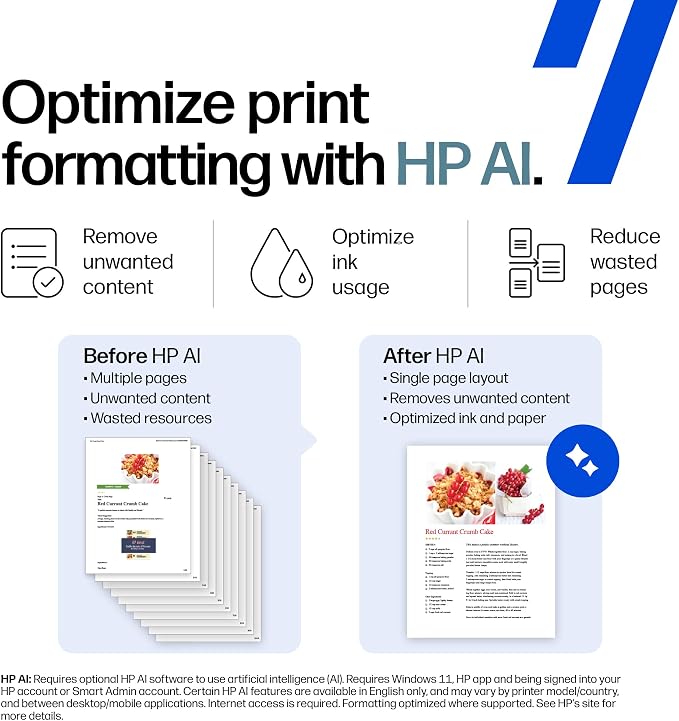
- AI capabilities ensure optimized print formatting without wasted pages.
- Features reliable dual-band Wi-Fi for seamless wireless printing.
- Comes with a 6-month trial of Instant Ink for hassle-free ink delivery.
- Compact design made with 70% recycled plastics, ENERGY STAR certified.
Ubuy Assurance
Experience worry-free shopping with 100% original products, PCI DSS-compliant payment security, ISO 27001-certified data protection, the fastest cross-border delivery, free returns *, and secure packaging on every order.