- Home Page /
- Software /
- Music /
- CD & DVD Burning & Labeling /
- Pinnacle Studio 8.0 Video Editing with CDDVD Authoring
0 ratings


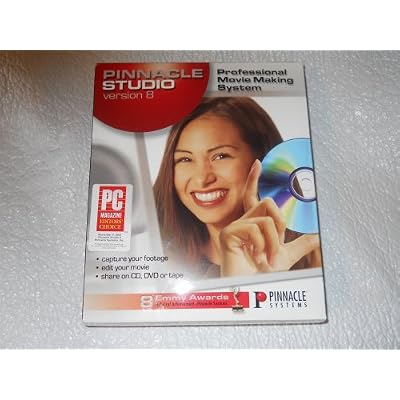
Pinnacle Studio 8.0 Video Editing with CDDVD Authoring
0 ratings
Write a review
Out of stock
 Imported from USA store
Secured transaction
Ubuy works hard to protect your security and privacy. Our advanced payment security system ensures confidentiality by encrypting your information during transmission using AES (Advanced Encryption Standards) and SSL (Secure Socket Layer) protocols. Your payment details are 100% secure as we do not share your payment details with third party sellers.
Our Top Logistics Partners


Fast
Shipping

Free
Return*

Secure Packaging

100% Original Products

PCI DSS Compliance

ISO 27001 Certified


Note: Step Down Voltage Transformer required for using electronics products of US store (110-120). Recommended power converters Buy Now.


What Stands Out
User-Friendly Interface
Pinnacle Studio 8.0 offers an intuitive interface, making it accessible for beginners while providing advanced features for seasoned editors, ensuring a smooth editing experience for all skill levels.
Powerful Authoring Tools
Integrating CD/DVD authoring tools enables seamless sharing of completed projects, allowing users to create professional-quality discs directly from the editing timeline, saving time and enhancing productivity.
Comprehensive Editing Options
With robust video effects, transitions, and multi-track editing capabilities, users can achieve cinematic-quality results, setting Pinnacle Studio apart from competitors by addressing diverse video editing needs.
Product Details
| Item Weight | 1 lbs (450 grams) |
Who Should Buy?

-
Beginner Editors
Ideal for novice users looking to learn video editing basics with an easy-to-use interface and tutorials.
-
Home Video Creators
Perfect for individuals wanting to edit home videos and create DVDs for family gatherings or events.
-
Budget-Conscious Users
Attractive for those seeking an affordable video editing solution without needing advanced features or hardware.

-
Professional Editors
Lacks advanced features required by professionals for high-end video production or complex editing tasks.
-
Advanced Users
Experienced editors may find the interface limiting and lacking the sophisticated tools for complex projects.
-
High-Resolution Projects
Not suitable for users needing to edit high-resolution 4K or higher videos due to performance limitations.
Product Description
Pinnacle Studio 8.0 Video Editing with CDDVD Authoring
Have any Query? Chat with us
Customer Questions & Answers
-
Question:
What are the key features of Pinnacle Studio 8.0?
Answer: Pinnacle Studio 8.0 boasts powerful video editing capabilities, including multi-track editing, a variety of video effects, and customizable transitions. Users can also create DVDs directly from their projects, making it a versatile tool for video enthusiasts. The software supports various video formats, allowing users to import and export in HD quality. This versatility caters to both amateur filmmakers and seasoned editors looking to enhance their editing workflow. -
Question:
Is Pinnacle Studio 8.0 suitable for beginners?
Answer: Yes, Pinnacle Studio 8.0 is designed with user-friendly features that cater to beginners. The intuitive interface simplifies the video editing process, allowing novices to learn quickly while creating professional-looking projects. Tutorials and guided workflows enhance the learning experience for those new to video editing, ensuring they can explore creative potential without feeling overwhelmed. -
Question:
Can Pinnacle Studio 8.0 import files from other editing software?
Answer: Pinnacle Studio 8.0 allows users to import video files from various other editing software and formats, including AVI, MPEG, and WMV. This capability enables smoother transitions between different platforms, making it easier for users who may have started their projects elsewhere. This flexibility helps in maintaining continuity in editing styles and techniques. -
Question:
What types of video projects can I create with Pinnacle Studio 8.0?
Answer: With Pinnacle Studio 8.0, users can create a wide range of video projects, from home movies and vlogs to professional presentations and promotional videos. The software's versatility allows users to incorporate music, voiceovers, and sound fx, along with visual effects that enhance storytelling. This makes it suitable for personal, educational, or business-related video content. -
Question:
Does Pinnacle Studio 8.0 support HD video editing?
Answer: Absolutely, Pinnacle Studio 8.0 supports HD video editing, enabling users to produce high-quality projects in 720p and 1080p formats. This capability is essential for capturing detailed visuals and ensuring that final outputs meet modern viewing standards. Whether creating content for social media or film festivals, this feature enhances the professional appeal of the projects. -
Question:
Are there any video effects included with Pinnacle Studio 8.0?
Answer: Yes, Pinnacle Studio 8.0 comes loaded with a variety of video effects, including color correction, slow motion, and green screen capabilities. These effects can elevate the aesthetic quality of your videos and allow for creative flexibility during editing. Users can apply effects to enhance storytelling or to match a specific theme, making their videos more engaging and visually appealing. -
Question:
How do I create a DVD using Pinnacle Studio 8.0?
Answer: Creating a DVD with Pinnacle Studio 8.0 is straightforward. After completing your video project, users can navigate to the DVD authoring options where they can choose menu designs and add chapters. The software guides you through the process, ensuring that the final product is ready for viewing on standard DVD players. This functionality is perfect for sharing videos with family or producing professional presentations. -
Question:
What system requirements do I need to run Pinnacle Studio 8.0?
Answer: To run Pinnacle Studio 8.0 effectively, ensure your system meets the recommended requirements including a multi-core processor, at least 2GB of RAM, and sufficient disk space for video files. A dedicated graphics card may also enhance performance during editing. These specifications ensure smooth functionality, especially when dealing with high-resolution videos and multiple editing tracks. -
Question:
Can I add music or sound effects to my video projects?
Answer: Yes, Pinnacle Studio 8.0 allows users to add music tracks and sound effects easily. You can import your own audio files or choose from the built-in audio library. This feature is critical for enhancing the mood of your videos and improving audience engagement. Whether using background music for personal memories or dramatic soundscapes for presentations, sound integration adds professionalism to projects. -
Question:
Where can I buy Pinnacle Studio 8.0 Video Editing with CDDVD Authoring?
Answer: You can purchase Pinnacle Studio 8.0 Video Editing with CDDVD Authoring from Ubuy in Turkmenistan. Ubuy offers a convenient platform with various options, making it easy for customers to find and acquire this powerful video editing software.
Pinnacle Systems CD & DVD Burning & Labeling Editorial Review
Pinnacle Studio 8.0 Video Editing with CD/DVD Authoring has received mixed reviews from customers. Many users found that the software was not compatible with newer versions of Windows, causing frustration and a need to find older computers to run the program. Some users who were new to video editing found the program to be challenging and opted to purchase a different software geared towards beginners. One user from 2002 shared a particularly negative experience, citing issues with audio quality and poor customer service from the company. Despite purchasing new hardware as suggested by the company, the problems persisted, and the user was faced with additional charges just to contact customer support. Attempts to reach out through email were met with automated responses and lack of resolution, leading to a year-long struggle to create a DVD. Overall, while some users may find the software easy to use once they are familiar with it, others have faced compatibility issues, technical problems, and poor customer service from Pinnacle Studio.
Customer Reviews & Ratings
1 customers ratings
-
5 Star
100%
-
4 Star
0%
-
3 Star
0%
-
2 Star
0%
-
1 Star
0%
Review this product
Share your thoughts with other customers
Pros
- Simple to use once users get the hang of it
- Offers a variety of editing options
Cons
- Audio quality problems reported by some users
Product Price History
Important information
- Limitations : For products shipped internationally, please note that any manufacturer warranty may not be valid; manufacturer service options may not be available; product manuals, instructions, and safety warnings may not be in destination country languages; the products (and accompanying materials) may not be designed in accordance with destination country standards, specifications, and labeling requirements; and the products may not conform to destination country voltage and other electrical standards (requiring use of an adapter or converter if appropriate). The recipient is responsible for assuring that the product can be lawfully imported to the destination country. When ordering from Ubuy or its affiliates, the recipient is the importer of record and must comply with all laws and regulations of the destination country.
- Not all the products listed on Ubuy are for sale, as Ubuy is a global search engine. Products are subject to export/trade regulations.
Currently unavailable.
We don't know when or if this item will be back in stock.
This item is not restrict in my country.(Please click on above link if this item is not restrict in your country, So our team will review and allow.)
Secured transaction
Ubuy works hard to protect your security and privacy. Our advanced payment security system ensures confidentiality by encrypting your information during transmission using AES (Advanced Encryption Standards) and SSL (Secure Socket Layer) protocols. Your payment details are 100% secure as we do not share your payment details with third party sellers.
Our Top Logistics Partners
Fastest cross-border delivery